Map Rankings Report
1. Introduction
The Map Rankings Report in the Keywords Section of the Storagely Reporting Engine provides insights into how well your storage facility ranks in Google Maps search results. By tracking keyword rankings over different time periods, facility operators can monitor Google Business Profile performance, identify ranking trends, and optimize their local SEO strategy.
This report can be viewed for a single facility or across an entire portfolio, allowing for both individual location analysis and multi-site SEO evaluation.
2. Navigating to the Map Rankings Report
To access the Map Rankings Report:
- Log in to your Storagely Dashboard.
- In the left sidebar menu, click on Reporting Engine.
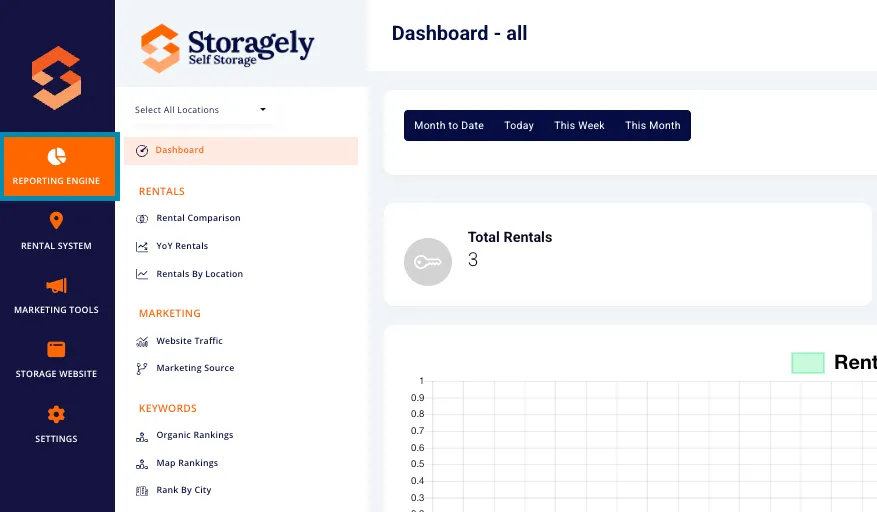
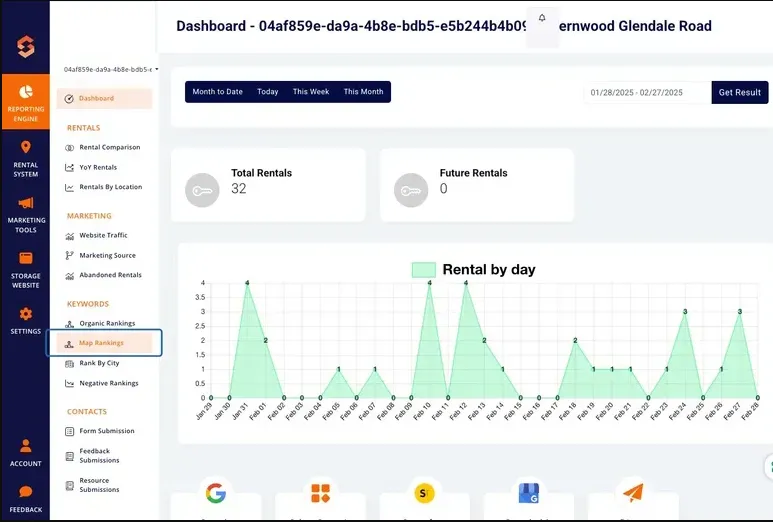
- Navigate to the Keywords Section and select Map Rankings.
3. Understanding the Interface
A. Selecting Locations
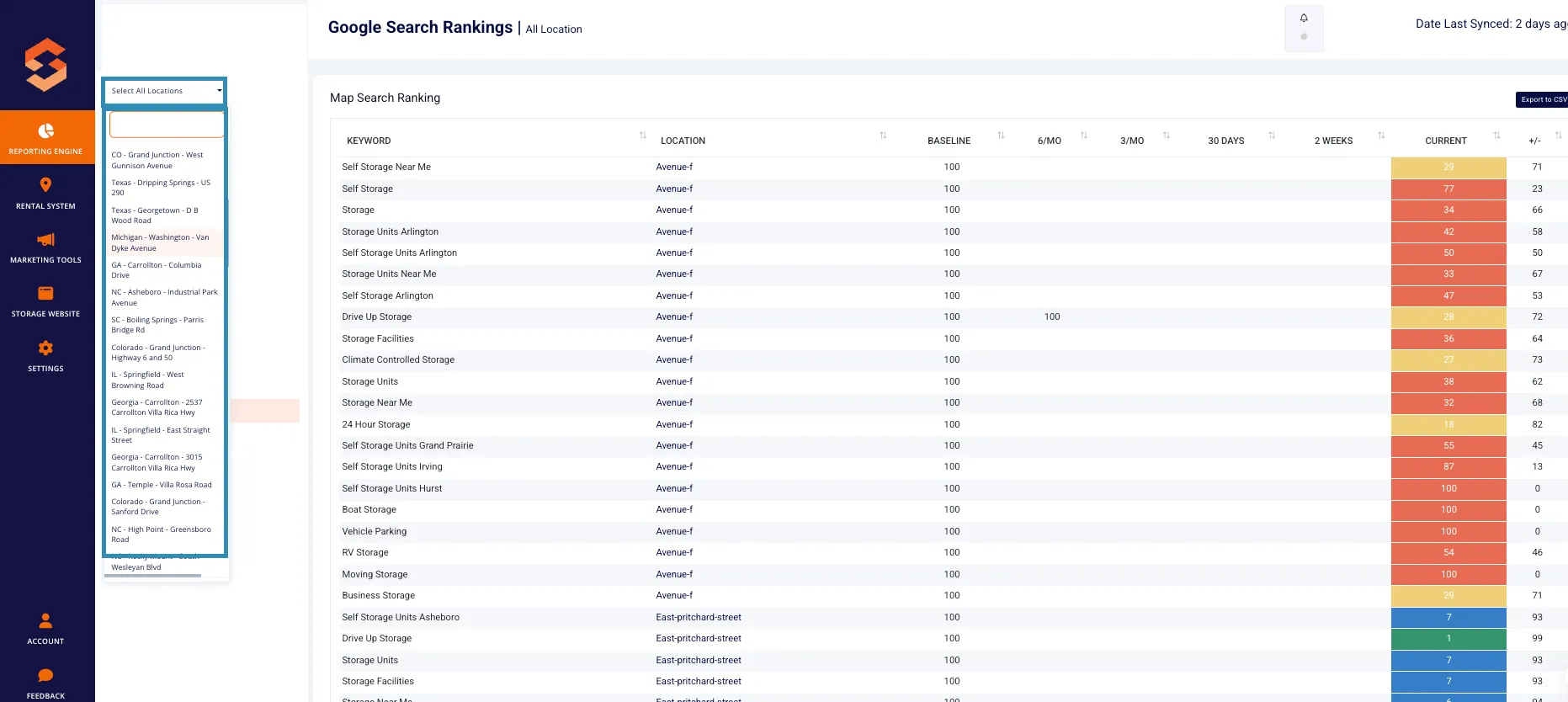
Users can view data for a single facility or all locations using the dropdown menu in the top left corner. This allows facility operators to analyze rankings at a specific site or across multiple locations.
B. Date Last Synced
The report includes a "Date Last Synced" indicator, which shows when the rankings were last updated, ensuring users are working with the latest data.
C. Key Metrics Displayed
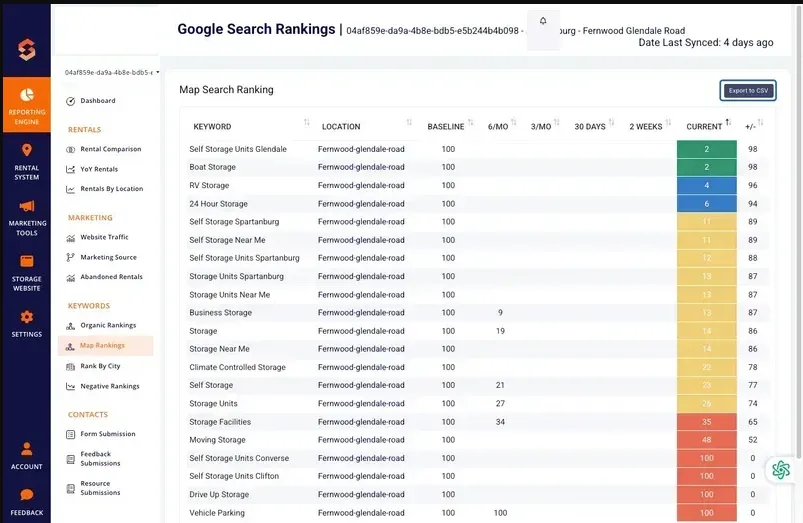
The report provides ranking data for each tracked keyword over multiple time frames, helping users analyze SEO trends. The table includes the following columns:
- Keyword – The specific keyword being tracked.
- Location – The facility associated with the keyword ranking.
- Baseline – The keyword’s rank when tracking began.
- 6/MO – The rank recorded six months ago.
- 3/MO – The rank recorded three months ago.
- 30 Days – The rank recorded one month ago.
- 2 Weeks – The rank recorded two weeks ago.
- Current – The latest keyword ranking in Google Maps search results.
- +/- – The change in rank compared to the baseline.
Note: There is a known issue with missing data in the 6/MO, 3/MO, 30 Days, and 2 Weeks columns. We intend to have this issue resolved in a future update.
Each keyword ranking is color-coded to indicate its performance level:
- Ranks 1-3: Green (Top search results in Google Maps)
- Ranks 4-10: Blue (Still within the first page of results)
- Ranks 11-30: Yellow (Second/third page results)
- Ranks 31+: Red (Low visibility in Google Maps)
4. Sorting and Filtering Data
A. Sorting Columns
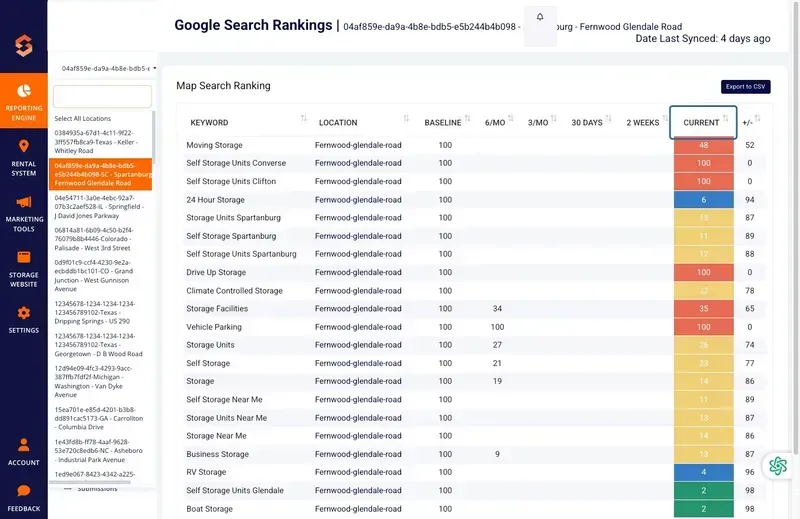
Users can sort the table in ascending or descending order by clicking the up/down arrows in the column headers. The following columns are sortable:
- Keyword
- Location
- Baseline
- 6/MO
- 3/MO
- 30 Days
- 2 Weeks
- Current
- +/- (Change in Rank)
5. Exporting Data
The export feature allows users to download their Map Rankings Report as a CSV file for further analysis. The export includes:
- Keyword
- Location
- Baseline, 6/MO, 3/MO, 30 Days, 2 Weeks, and Current Rankings
- +\- (Change in rank over time)
To export:
- Click the Export to CSV button in the top-right corner.
- The file will download automatically for offline analysis or reporting.
6. How to Use the Map Rankings Report
Step 1: Select a Location
Use the location dropdown in the top left to filter data by a specific facility or view all locations.
Step 2: Choose a Sorting Preference
Click on any column header to sort rankings by keyword, location, or ranking period.
Step 3: Apply Ranking Filters
Use the ranking range buttons to focus on high-performing, mid-level, or low-ranking keywords.
Step 4: Analyze Ranking Trends
- Identify keywords gaining traction in Google Maps to reinforce successful SEO strategies.
- Spot keywords losing rank and adjust local SEO efforts accordingly.
Step 5: Export Data for Reporting
Download your keyword ranking report for further SEO analysis and marketing strategy planning.
7. Best Practices for Improving Google Maps Rankings
To improve your keyword rankings in Google Maps search results, consider these local SEO best practices:
A. Optimize Your Google Business Profile
- Ensure your business name, address, and phone number (NAP) are accurate and consistent across all platforms.
- Complete all Google Business Profile sections, including business hours, services, and amenities.
- Regularly update your facility photos and posts to keep your profile active.
B. Gather More Positive Reviews
- Encourage satisfied customers to leave Google reviews by providing a direct review link.
- Respond to all reviews (both positive and negative) in a professional and timely manner.
- Higher review count and positive ratings improve local search rankings.
C. Improve Local Citations
- Ensure your facility is listed in relevant online directories such as Yelp, YellowPages, and industry-specific directories.
- Maintain consistent and accurate business details across all listings.
D. Strengthen On-Page SEO
- Optimize your website’s location pages with relevant local keywords.
- Add structured data markup (schema) to enhance your local search presence.
E. Increase Engagement Signals
- Regularly post updates, promotions, or events on your Google Business Profile.
- Encourage customer interactions with features like Q&A and direct messaging.
F. Monitor and Adjust Strategy
- Use the Storagely Map Rankings Report to track progress and adjust strategies based on ranking trends.
- Compare rankings against competitors to identify opportunities for improvement.
8. FAQs & Troubleshooting
Q1: Why are some rankings missing in certain time periods? A: If a keyword wasn’t tracked during a previous period, ranking data may not be available.
Q2: How can I find keywords that need improvement? A: Use the sorting feature to rank keywords from worst to best performance.
Q3: Can I add additional keywords for tracking?
A: Yes! For more information on how to add additional keywords, refer to this help article.
Q4: Can I track map rankings for multiple locations? A: Yes! Use the location dropdown to toggle between single facility and portfolio-wide rankings.
Q5: How often is ranking data updated? A: The “Date Last Synced” field indicates when rankings were last refreshed. Ranking data is refreshed weekly on Mondays.
As always, if you have any questions during this process, our Customer Success Team is here to help. The best way to reach us is by submitting a support ticket.