EZ Sign Setup Guide
Overview
Storagely’s EZ Sign feature was designed to simplify the rental process and reduce operational headaches for storage operators.
With EZ Sign:
- Customers no longer need to sign leases with their finger at the end of the rental flow.
- Rental agreements and addendums are signed electronically, minimizing friction.
- Operators reduce or eliminate the issue of having unsigned leases.
Important: At this time, EZ Sign is only available for operators using Storable EDGE as their facility management software (FMS).
Why EZ Sign Matters
Traditionally, customers were prompted to sign agreements via a pop-up window (similar to DocuSign) on their phone or tablet. This often created friction and, in some cases, left leases incomplete if customers skipped signing.
EZ Sign solves this by finalizing agreements electronically with the customer’s name applied directly to all documents upon payment.
Operators can choose between two deployment options:
1. Frictionless Deployment (Recommended)
- Disable the DocuSign-style step at the end of the rental flow.
- The completed payment finalizes the rental and electronically applies the customer’s name to the lease and addendums.
- Requires document changes in Storable EDGE (Storagely can assist with this update).
2. Hybrid Deployment
- Keep the DocuSign-style signature step at checkout.
- Customers can sign with their finger, but even if they don’t, their name is still electronically applied to all documents once payment is complete.
- Requires document changes in Storable EDGE (Storagely can assist with this update).
👉 In both scenarios, customers must acknowledge all agreements by checking boxes before rental completion. Each agreement/addendum is viewable via a sample document linkduring the rental process.
Step 1: Request EZ Sign Activation
EZ Sign is a global setting that applies to all locations and cannot be toggled per facility.
Access to the Feature Setup page is restricted to Storagely team members only.
To enable EZ Sign:
- Reach out to your designated Storagely point of contact.
- Provide the required lease and addendum documents (see next section).
- Storagely will turn on the Enable EZ Sign Feature (Storable EDGE) setting and complete the EZ Sign Setup on your behalf.
Step 2: Provide Your Lease and Addendum Documents
Because Storagely completes the EZ Sign Setup for you, your role is to provide all of the necessary documents.
You’ll need to supply:
- Protection Plan Terms Addendum
- Autopay Terms Addendum
- State Lease Agreements
Important Requirements
- If your documents differ by state, provide a version for each state.
- If your documents differ by location, provide a version for each location.
- File formats accepted: PDF, DOC, DOCX.
- Storagely will handle the correct file naming and uploading on your behalf.
Customer Experience with EZ Sign
- During checkout, customers see checkboxes for each agreement and addendum.
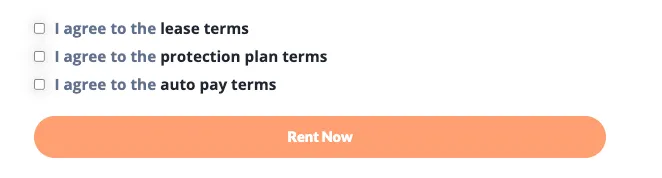
- They must acknowledge each before finalizing their rental.
- They can click a link to preview a sample copy of each document.
- Once payment is completed, their name is electronically applied to all agreements.
Best Practices & Notes
- Work with Storagely: Because setup is completed by Storagely, ensure you deliver all required lease and addendum documents upfront.
- Provide All Variants: Double-check if your lease/addendums differ by state or location. Storagely must have all versions in order for EZ Sign to function properly.
- Global Setting: EZ Sign applies to all facilities under your Storagely account.
- Fallback Protection: If you keep the DocuSign-style option, customer names are still applied electronically—so your leases remain enforceable even if the finger-signature isn’t completed.
✅ With EZ Sign, you’ll create a smoother rental experience for customers and ensure that every lease is completed without delays.
As always, if you have any questions during this process, our Customer Success Team is here to help. The best way to reach us is by submitting a support ticket.