Listings
1. Introduction
The Listings section in the Marketing Tools of the Storagely Dashboard provides facility operators with a centralized tool for managing their business listings across various online directories. Keeping listings accurate and up-to-date ensures better online visibility, improves local SEO rankings, and helps potential renters find your facilities easily.
Important Note:
- The Listings tool only displays data for one location at a time.
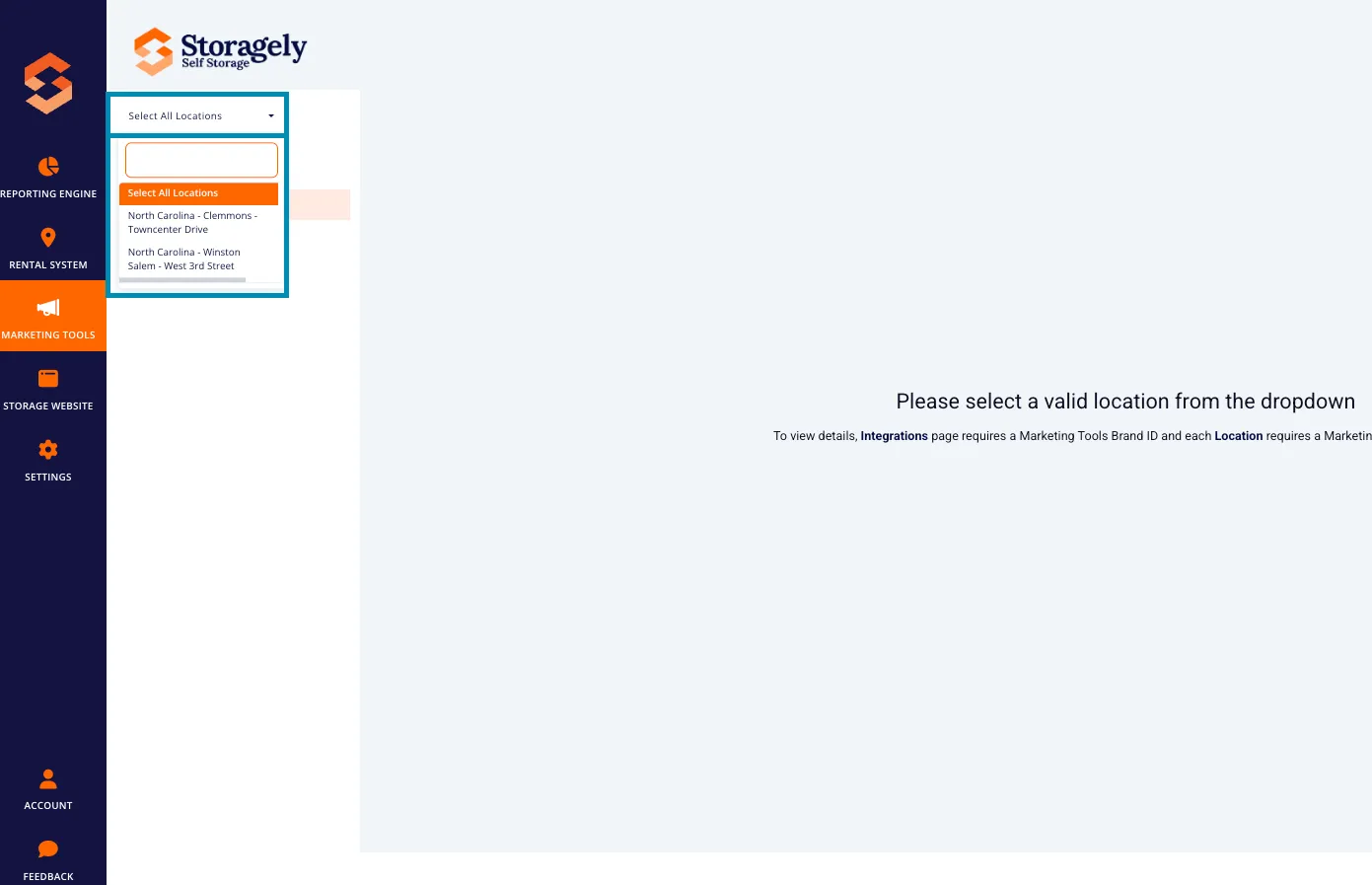
- Users must select a specific location from the dropdown menu in the top left corner to view its listing details.
2. Navigating to Listings
To access the Listings section:
- Log in to your Storagely Dashboard.
- In the left sidebar menu, click on Marketing Tools.
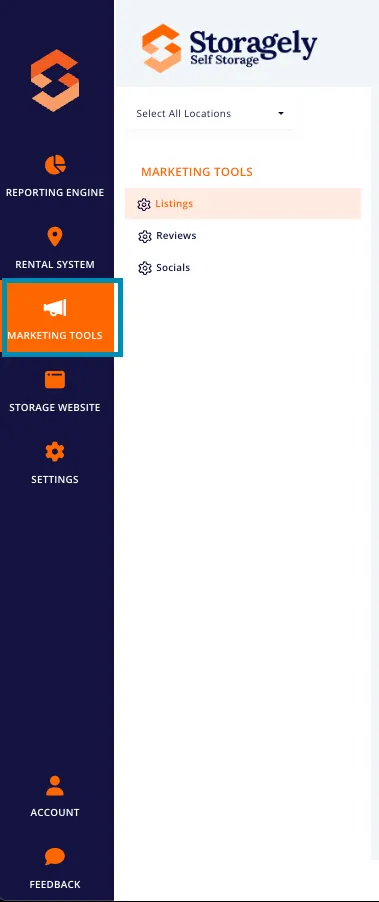
- Select Listings from the available options.
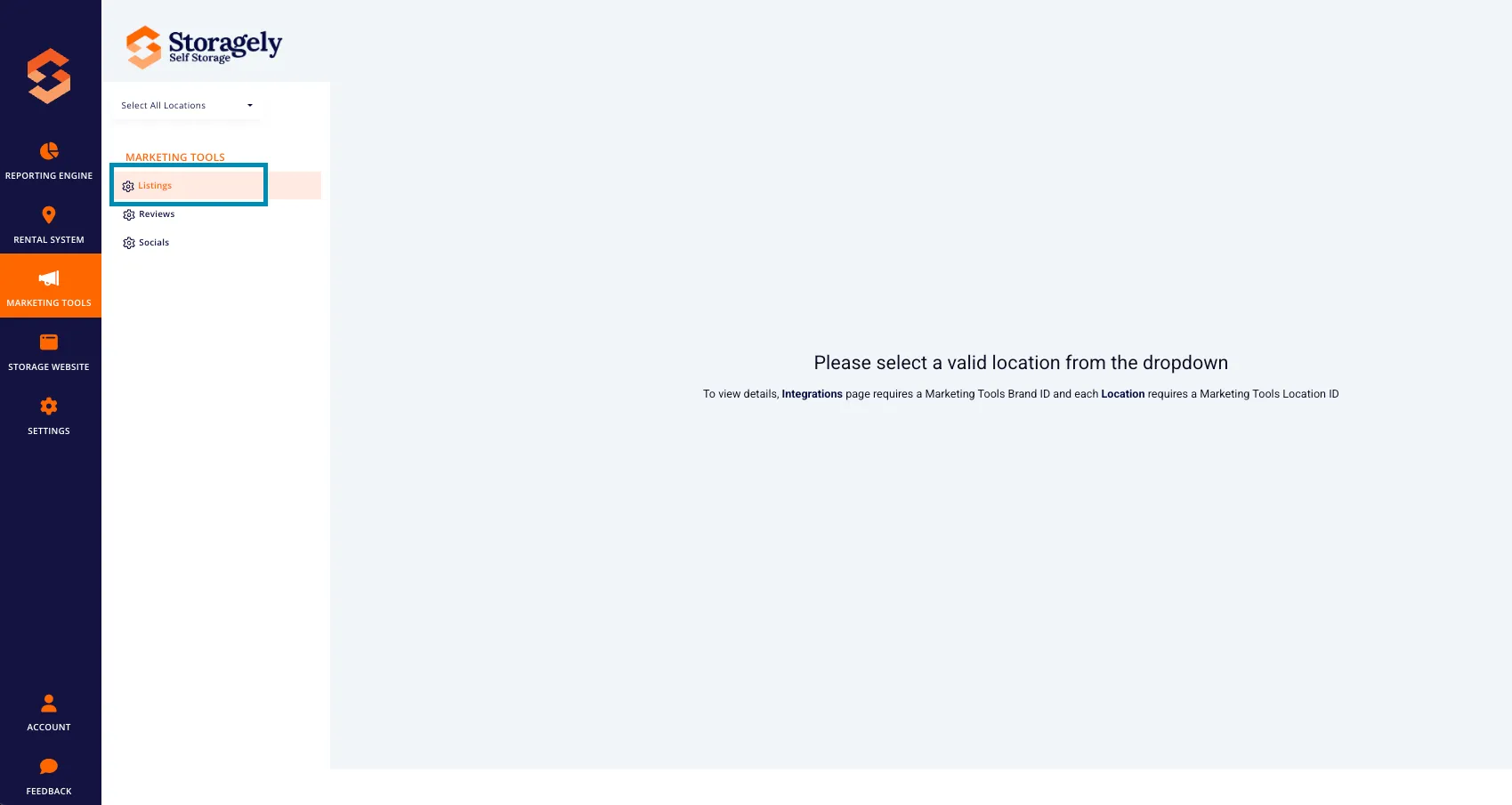
- Use the dropdown menu in the top left corner to select the facility whose listing data you want to view.
3. Understanding the Listings Interface
The Listings page provides an overview of a facility’s presence across various online directories and allows users to ensure listing accuracy.
A. Selecting a Location
- Users can only view one facility at a time.
- To switch between locations:
- Click the dropdown menu in the top left corner.
- Select the desired facility location.
- The page will update to display the listing details for that specific location.
B. Business Listings Overview
- Displays the selected facility's current listing status across various online platforms (e.g., Google My Business, Yelp, Bing, Apple Maps).
- Highlights any incomplete or inconsistent listings.
C. Syncing and Updating Listings
- Provides real-time syncing status to ensure the facility’s listing remains accurate and consistent across platforms.
D. Where Your Facility Is Listed & How Listings Work
Storagely helps keep your facility’s information accurate and consistent across the internet. This includes search engines, maps, review platforms, and local business directories where potential renters may look for storage near them.
Rather than managing each platform individually, Storagely distributes your business information across many platforms at once.
Where Your Facility Appears Online
Your facility’s listing information may appear on platforms such as:
- Google Business Profile
- Apple Maps
- Bing
- Yelp
- Additional local, regional, and niche business directories
These platforms help customers:
- Find your facility
- Get directions
- View hours and contact information
- Read reviews
- Compare nearby storage options
Listings Platforms Supported by Storagely
Below is a list of common platforms where your facility’s information may appear.
Important: Not every platform requires action. Some listings update automatically, while others require you to connect your account to enable full syncing.
Platform | Category | What This Means for You |
|---|---|---|
Google Business Profile | Search & Maps | Requires account connection for full control |
Apple Maps | Search & Maps | Updates automatically |
Bing | Search Engine | Updates automatically |
Yelp | Reviews & Local Search | Requires account connection |
Social / Business Profile | Requires account connection | |
Social / Business Profile | Location data updates automatically | |
MapQuest | Maps & Navigation | Updates automatically |
Waze | Maps & Navigation | Updates automatically |
Uber | Navigation & Mobility | Updates automatically |
Lyft | Navigation & Mobility | Updates automatically |
DuckDuckGo | Search Engine | Updates automatically |
YellowPages (network) | Business Directory | Updates automatically |
SuperPages | Business Directory | Updates automatically |
Chamber of Commerce | Business Directory | Updates automatically |
Hotfrog | Business Directory | Updates automatically |
Infobel | Business Directory | Updates automatically |
CitySearch | Local Search | Updates automatically |
CitySquares | Business Directory | Updates automatically |
DexKnows | Business Directory | Updates automatically |
EZLocal | Business Directory | Updates automatically |
Judy’s Book | Business Directory | Updates automatically |
Local Mint | Business Directory | Updates automatically |
ShowMeLocal | Business Directory | Updates automatically |
Speedy Local | Business Directory | Updates automatically |
GoLocalPages | Business Directory | Updates automatically |
ProSearchDirectory | Business Directory | Updates automatically |
SmartBusinessSearch | Business Directory | Updates automatically |
Bizmetron | Business Directory | Updates automatically |
MyLocalEdge | Business Directory | Updates automatically |
LocaList360 | Business Directory | Updates automatically |
Yoys (US & Canada) | Business Directory | Updates automatically |
JoomLocal | Business Directory | Updates automatically |
Zoom Local Search | Business Directory | Updates automatically |
iBegin | Business Directory | Updates automatically |
iGlobal | Business Directory | Updates automatically |
Local469 | Business Directory | Updates automatically |
EBusinessPages | Business Directory | Updates automatically |
LocalizedListings | Business Directory | Updates automatically |
OpenDi | Business Directory | Updates automatically |
PassPages | Business Directory | Updates automatically |
BubbleLife | Community Directory | Updates automatically |
eLocal | Business Directory | Updates automatically |
Enroll Business | Business Directory | Updates automatically |
MyLocalServices | Business Directory | Updates automatically |
NetLocalBiz | Business Directory | Updates automatically |
Sediora | Business Directory | Updates automatically |
GalacticVibe | Business Directory | Updates automatically |
LoclFocus | Business Directory | Updates automatically |
Localtunity | Business Directory | Updates automatically |
WhereToApp | Location Discovery | Updates automatically |
Geocaching | Location-Based App | Updates automatically |
Runtastic | Location-Based App | Updates automatically |
Lime | Mobility Platform | Updates automatically |
Agoda | Travel Directory | Updates automatically |
MerchantsNearby | Local Discovery | Updates automatically |
DateOnDeals | Deals & Promotions | Updates automatically |
YourTownVIP | Community Directory | Updates automatically |
MoorestownVIP | Community Directory | Updates automatically |
CherryHillVIP | Community Directory | Updates automatically |
JerseyShoreVIP | Community Directory | Updates automatically |
How Listings Are Updated
Not all listing platforms work the same way.
Platforms That Require a Connection Some major platforms require you to connect your account so Storagely can manage the listing.
Common examples:
- Google Business Profile
- Yelp
When connected:
- Updates appear faster
- Listings are more accurate
- Additional features like reviews and posts may sync
You may see a message like “Connect Account” if action is required.
Platforms That Update Automatically Many directories update automatically without requiring a login.
For these platforms:
- No account connection is needed
- Storagely submits updates on your behalf
- Changes may take longer to appear
This process helps ensure your business information is widely distributed and consistent across the web.
What Sync Status Means
You may see different statuses next to your listings:
- Synced – Your information is published and up to date
- Needs Action / Connect Account – A platform requires verification or access
- Connection Issue – A problem that may require support assistance
A connection issue does not mean your listing is broken — it simply means it needs attention.
How Long Updates Take
Update timing varies by platform:
- Some updates appear within hours
- Others may take several weeks
This is normal and depends on how often each platform refreshes its data.
Best Practices for Strong Listings Performance
- Keep your business name, address, phone number, and hours accurate
- Connect accounts when prompted
- Avoid manually editing listings outside of Storagely
- Allow time for updates to propagate
- Contact Storagely Support if a listing shows ongoing issues
Accurate listings help customers find your facility and support stronger local search visibility.
4. How to Manage Business Listings
Step 1: Select a Facility
- Click the dropdown menu in the top left corner.
- Choose the facility you want to manage.
- The page will update to display that facility’s listing information.
Step 2: Review Current Listing Status
- Check the listing status of the selected facility.
- Look for incomplete or incorrect listings that need updating.
Step 4: Switch to Another Facility (If Needed)
- Return to the dropdown menu in the top left corner.
- Select a different facility.
5. Troubleshooting Listing Issues
A. A Facility is Not Appearing in Listings
- Ensure the correct facility is selected in the dropdown menu.
- Verify that the facility is properly set up in the dashboard.
- Check that the facility’s address, phone number, and website are correct.
- If the issue persists, contact Storagely Support.
B. Listings Are Showing Incorrect Information
- Select the correct facility from the dropdown menu.
- Click "Edit Listing" and manually update the details.
- Save the listing to apply the changes.
C. Listings Are Not Syncing
- Confirm that the selected facility is connected to all supported listing services.
- If syncing issues continue, check if platform credentials need reauthorization.
6. Best Practices for Managing Business Listings
✅ Ensure business details (NAP) are accurate across all listings. ✅ Regularly check and update listings for each facility separately. ✅ Save or submit listings after making updates to push changes live. ✅ Monitor changes in business hours and update them promptly. ✅ Engage with customer reviews on listing platforms to improve credibility.
7. FAQs & Troubleshooting
Q1: Why do I only see one facility at a time? A: The Listings tool is designed to show data for only one facility at a time. Use the dropdown menu in the top left corner to switch between locations.
Q2: How often should I update my listings? A: Listings should be updated whenever business details change, or at least quarterly to ensure accuracy.
Q3: How do I fix duplicate listings? A: Contact the platform’s support team (e.g., Google, Yelp) to remove duplicates, or manually claim and update them.
Q4: Why is my facility missing from search results? A: Ensure your business is properly verified and synced across platforms. Check for incorrect addresses or missing details.
As always, if you have any questions during this process, our Customer Success Team is here to help. The best way to reach us is by submitting a support ticket.