How to Set Up Smart Unit Monitoring on Your Website
Smart Unit Monitoring gives your renters peace of mind with 24/7 protection—and gives you the option to offer it:
- ✅ As a default feature on specific units, or
- ✅ As an optional add-on during the rental checkout process.
This article explains how to enable Smart Unit Monitoring on your Storagely-powered website using your FMS and your Storagely Dashboard.
✅ Step 1: Set Up Smart Unit Monitoring in Your FMS
To begin, you must first configure Smart Unit Monitoring in your Facility Management Software (FMS). If you use Storable EDGE, follow the official help articles to set up a recurring service.
🛠 Be sure to enable the Smart Unit Monitoring service for each location where it will be offered.
🔄 Tag Smart Units Correctly
Storagely uses the logic in your FMS to detect whether a unit offers Smart Unit Monitoring. The system will flag a unit as "Smart" if:
- The Unit Type includes the phrase "smart unit", OR
- The Unit Amenity includes the phrase "smart unit"
Use either of the following guides:
📝 Important: The words “smart unit” must be included for the website to display Smart Unit Monitoring features.
🖥️ Step 2: Activate the Feature in Your Storagely Dashboard
Once the service and logic are configured in your FMS, follow these steps to display Smart Unit Monitoring on your rental website:
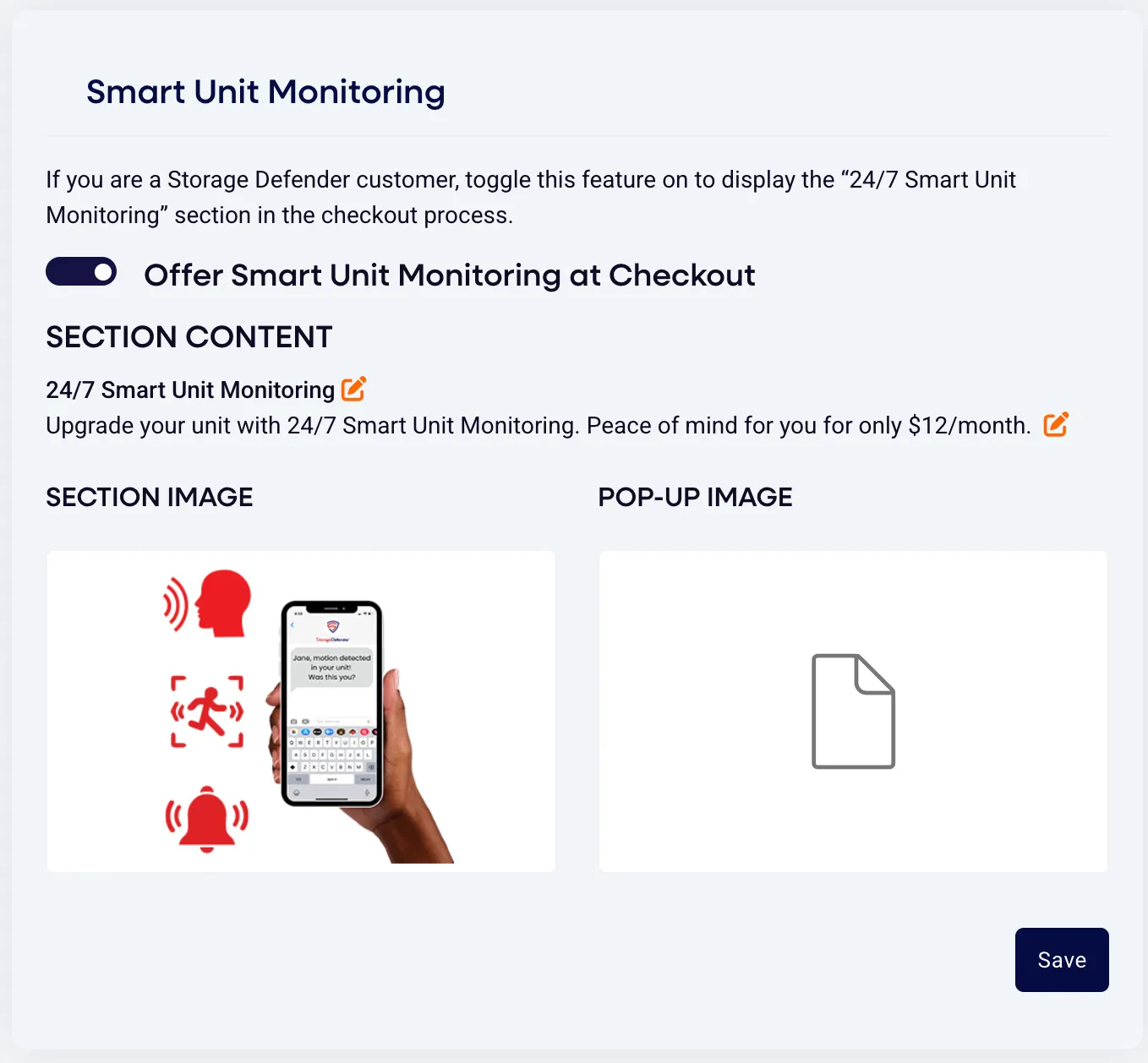
- Go to your Storagely Dashboard
- Navigate to: Rental System Settings → Rental System tab → Smart Unit Monitoring
- Toggle ON the feature: “Offer Smart Unit Monitoring at Checkout”
- Optional: Customize the display content (title, description, section image, and pop-up image)
⚠️ For One Page Checkout Customers
If your location is live on Storagely’s One Page Checkout, please reach out to us directly so we can enable Smart Unit Monitoring for the appropriate location(s). We’ll take care of the final step to make sure it displays properly.
How One Page Checkout Handles Smart Unit Monitoring
- ✅ The One Page Checkout pulls in all active services by location and lists them in the Add-Ons section.
- 🔒 If a unit is configured in the FMS as a designated or required smart unit, the Smart Unit Monitoring add-on will:
- Appear as pre-selected (toggled ON)
- Not be editable by the renter
- 🎛️ If a facility has units that can be upgraded to Smart Units, the operator can choose:
- Whether the Smart Unit Monitoring toggle is defaulted ON or OFF at checkout
- Renters will have the ability to select or deselect the add-on if it’s optional
This ensures a seamless experience and keeps your FMS logic synced to the website rental flow.
💡 Best Practices
- You can enable Smart Unit Monitoring for just a few units to start, or roll it out facility-wide.
- Adding it as an optional upsell helps increase your recurring revenue while giving renters flexibility.
- Update the section image and description in your dashboard to reflect your brand voice and pricing.
❓ Troubleshooting Tips
If Smart Unit Monitoring isn’t appearing:
- Confirm the Unit Type or Amenity contains the text "smart unit"
- Ensure the recurring service is enabled and applied to the correct locations in your FMS
- Check that the feature toggle is turned ON in the Storagely Dashboard
- If you’re using One Page Checkout, contact us to activate it for the right location(s)
🎯 Summary
Step | Action |
|---|---|
1️⃣ | Set up Smart Unit Monitoring as a recurring service in your FMS |
2️⃣ | Ensure the unit type or amenity contains the keyword “smart unit” |
3️⃣ | Enable the service for the correct locations in your FMS |
4️⃣ | Toggle ON the feature in your Storagely Dashboard |
5️⃣ | For One Page Checkout: Contact Storagely to complete setup |
🎉 | Done! The feature will now appear on the checkout screen |
As always, if you have any questions during this process, our Customer Success Team is here to help. The best way to reach us is by submitting a support ticket.