How To: Enable Browser Notifications for Live Chat
2 min
This article will guide you through the steps to enable browser notifications in your live chat software, ensuring you never miss an important message.
Steps to Enable Browser Notifications
- Log In to Your Live Chat Software: Start by logging into your live chat account.
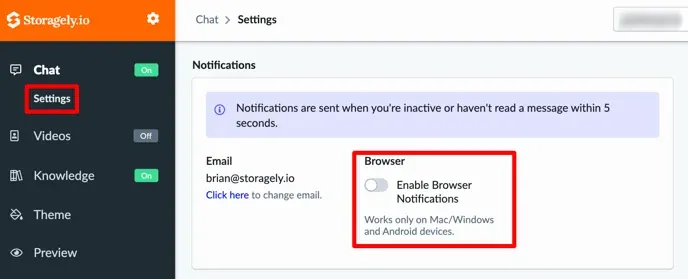
- Access the Chat Settings:
- Navigate to the Settings section.
- You’ll find this under the Chat menu located on the left-hand side of the dashboard.
- Enable Browser Notifications:
- Locate the option to Enable Browser Notifications.
- Toggle the button to activate notifications.
- Complete the Setup:
- Follow any additional prompts or instructions that appear to complete the process.
- Ensure your browser permissions allow notifications from the live chat software.
Why Enable Browser Notifications?
Enabling browser notifications ensures you’re instantly alerted to incoming messages, helping you respond quickly and provide exceptional customer service.
If you encounter any issues, refer to the help section in your live chat software or contact support for assistance.
Have a question?
Our super-smart AI, knowledgeable support team and an awesome community will get you an answer in a flash.
To ask a question or participate in discussions, you'll need to authenticate first.