FMS Mapping Settings
1. Introduction
The FMS Mapping section in the Storagely Dashboard allows facility operators to map marketing sources from their Facility Management Software (FMS) to Storagely's marketing source tracking system. This ensures that marketing attribution data is accurate and aligns with Storagely’s reporting and analytics.
Important Notice:
- FMS Mapping settings are restricted by default to prevent data mismatches.
- Users must coordinate with their Storagely Account Manager for any modifications.
- Proper mapping ensures that marketing reports accurately reflect customer acquisition sources.
2. Navigating to FMS Mapping Settings
To access the FMS Mapping:
- Log in to your Storagely Dashboard.
- In the left sidebar menu, click on Settings.
- Select FMS Mapping under Marketing Source Setup.
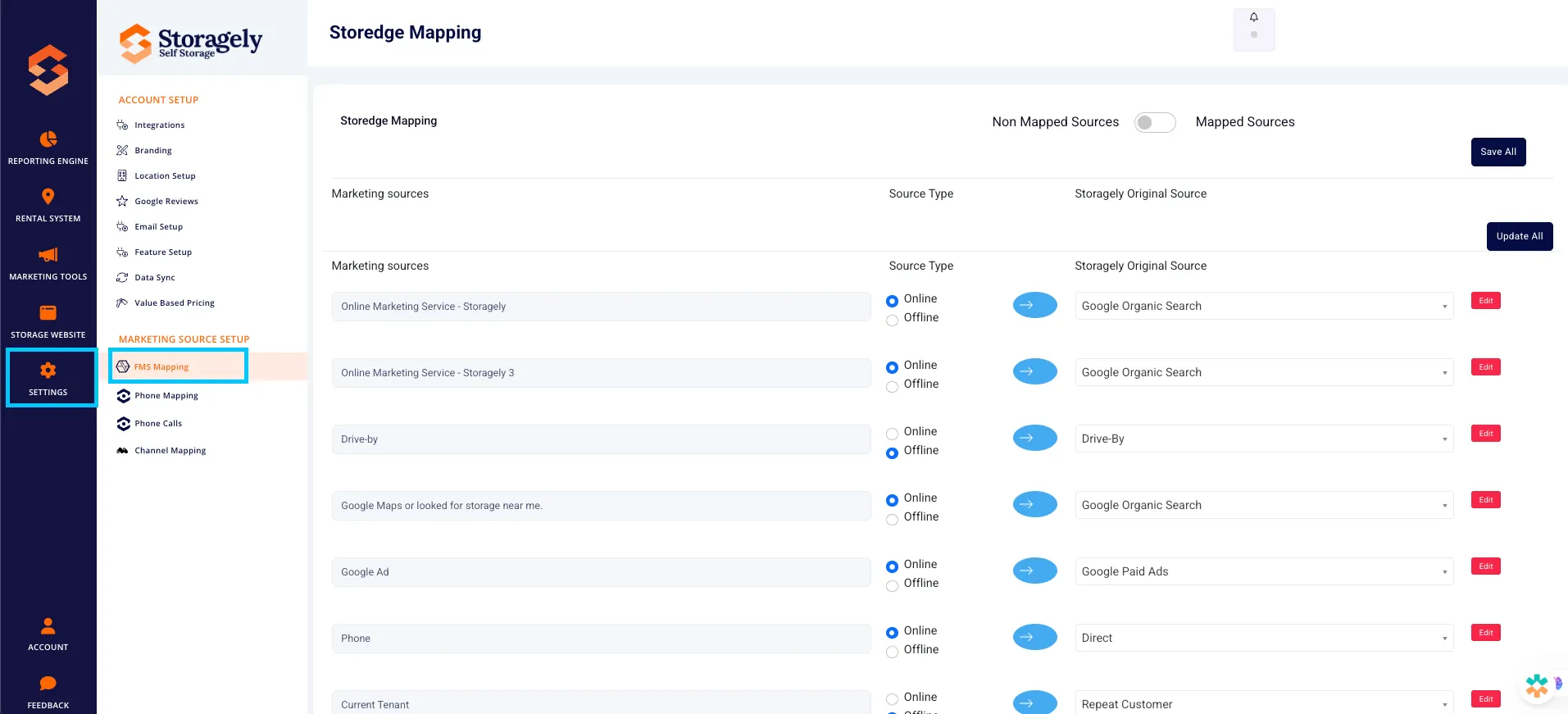
- If access is denied, contact your Storagely Account Manager for assistance.
3. Understanding the FMS Mapping Interface
A. FMS Mapping Table
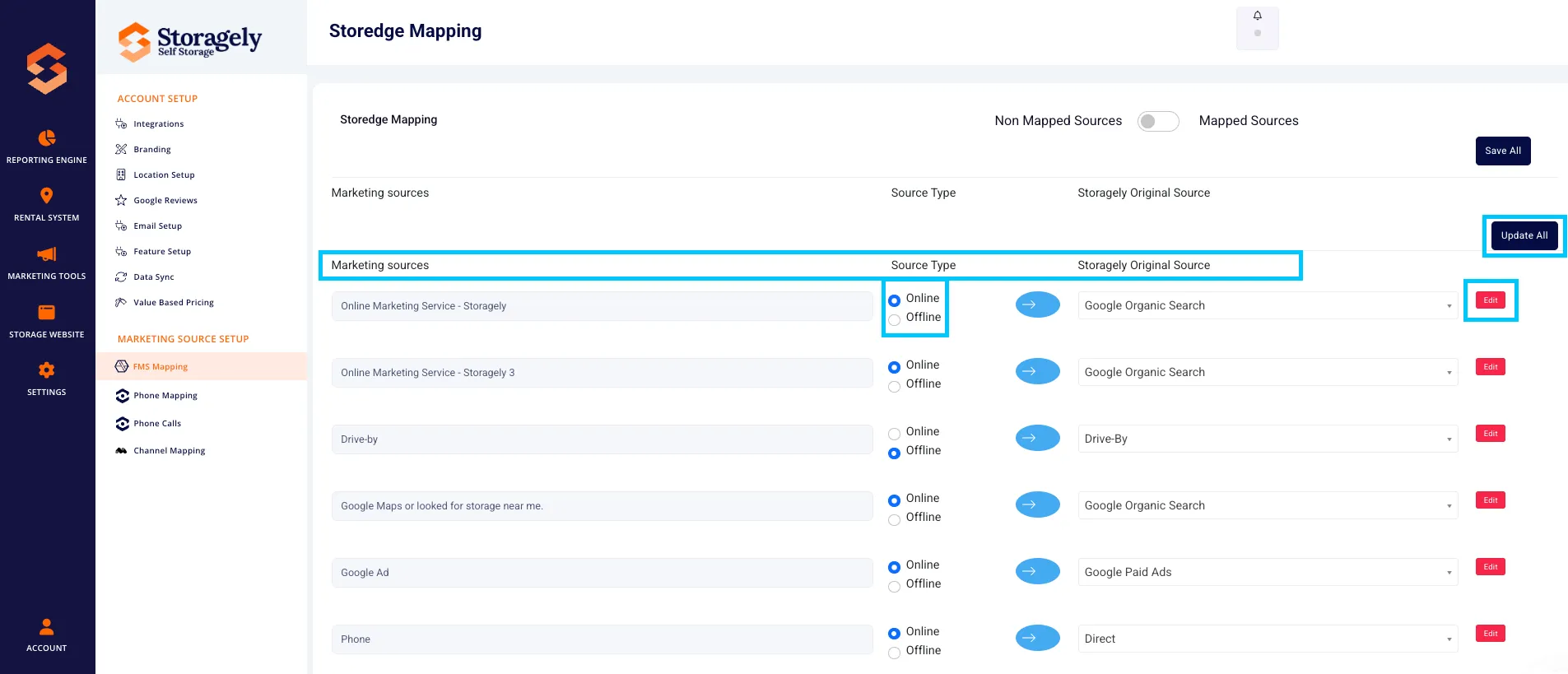
The interface displays a list of marketing sources from the FMS that need to be mapped to Storagely’s standardized sources.
Columns include:
- Marketing Source – The original marketing source name from the FMS.
- Source Type – Indicates whether the source is Online or Offline.
- Storagely Original Source – The mapped source in the Storagely system.
- Actions – Allows users to edit or update mappings.
B. Mapping Unmatched Sources
Some marketing sources from the FMS may not have a direct match in Storagely. These sources will be displayed in a "Non-Mapped Items" section, requiring manual assignment.
C. Updating Existing Mappings
For sources that were previously mapped, users can:
- Edit mappings if changes are needed.
- Reassign sources to more accurate categories.
- Save changes to update all mappings at once.
4. How to Map FMS Marketing Sources to Storagely
Step 1: Review Unmatched Marketing Sources
- Locate non-mapped marketing sources in the table.
- Identify which Storagely Original Source best matches each FMS source.
Step 2: Assign a Storagely Original Source
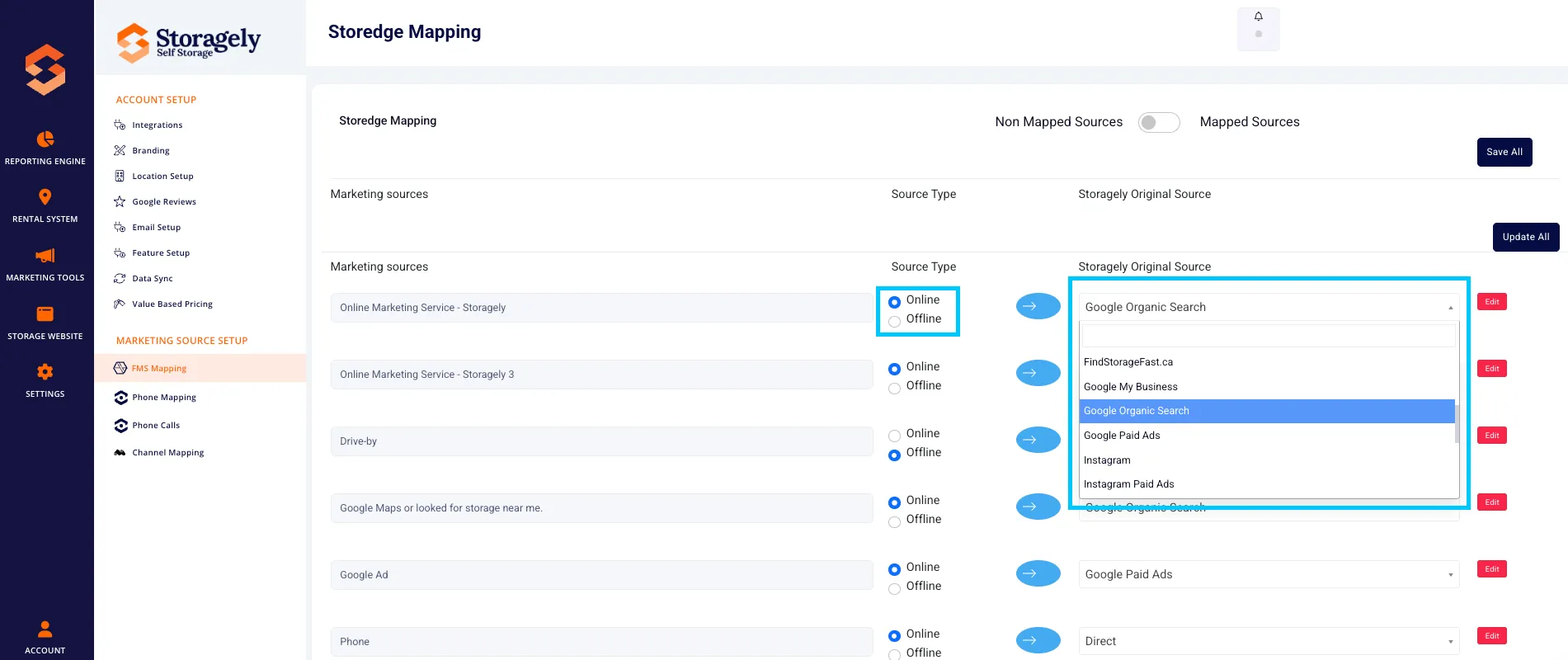
- Click the dropdown menu under Storagely Original Source.
- Select the most relevant marketing source (e.g., Google Organic Search, Yelp, Directories, Facebook Paid Ads).
- Choose whether the source is Online or Offline using the radio button.
Your Source | Type | Storagely Original Source |
|---|---|---|
"Google Maps" | Online | Google My Business |
"Drive-By" | Ofline | Drive-By |
"Facebook Paid Ad" | Online | Facebook Paid Ads |
"Yard Sign" | Offline | Billboard / Yard Sign |
"Referred by Friend" | Offline | Customer Referral |
Step 3: Save Changes
- After updating all necessary mappings, click “Save All” or “Update All” to apply the changes.
- Wait for the confirmation message that updates were successful.

Step 4: Verify Mapping Accuracy
- Review the Updated Mappings Table to ensure all sources are correctly assigned.
- If needed, make adjustments and re-save.
5. Best Practices for FMS Mapping
✅ Ensure accurate mapping by selecting the closest match for each source. ✅ Regularly review mappings to keep up with marketing strategy changes. ✅ Work with your Account Manager to confirm that mappings align with business goals. ✅ Use consistent naming conventions to avoid confusion in reports.
6. FAQs & Troubleshooting
Q1: Why can’t I edit FMS mappings? A: Access to these settings is restricted by default to prevent accidental mismatches. Contact your Storagely Account Manager for modifications.
Q2: What happens if an FMS marketing source doesn’t match a Storagely source? A: Select "Other" as a temporary category, then discuss with your Account Manager to create a more appropriate match.
Q3: How often should I review my FMS mappings? A: At least quarterly or whenever major marketing campaigns change.
Q4: Can I undo a mapping change? A: Yes, by reassigning the source and clicking Save All again.
As always, if you have any questions during this process, our Customer Success Team is here to help. The best way to reach us is by submitting a support ticket.