Integrations Settings
1. Introduction
The Integrations Settings in the Storagely Dashboard allow facility operators to connect and manage third-party software integrations that enhance the functionality of the platform. These integrations may include Facility Management Software (FMS), Payment Gateways, Marketing Tools, CRM Systems, and Analytics Platforms.
Important Notice: Access to the Integrations Settings is restricted by default to ensure the Storagely platform functions correctly. Any modifications to these settings should be made in partnership with your designated Storagely Account Manager.
2. Navigating to Integrations Settings
To access the Integrations Settings:
- Log in to your Storagely Dashboard.
- In the left sidebar menu, click on Settings.
- Select Account Setup → Integrations.
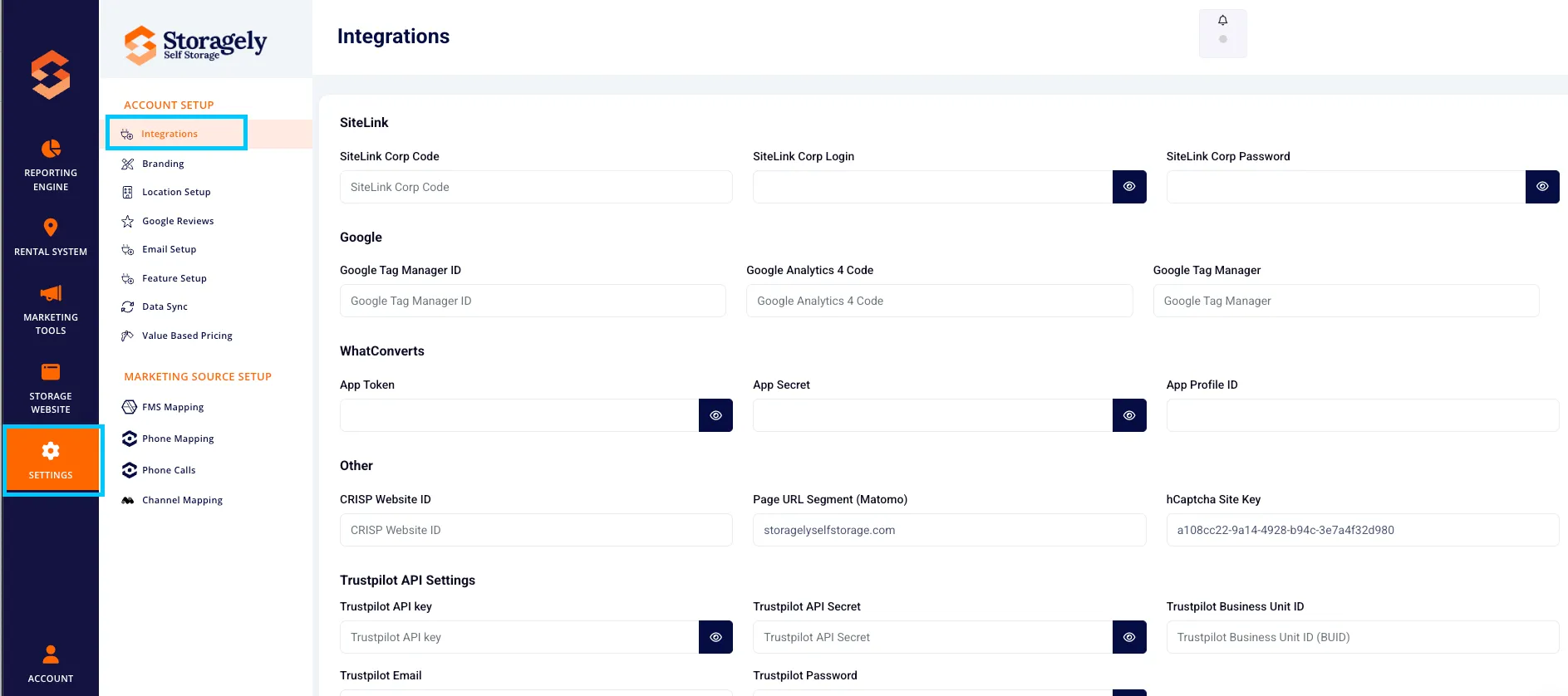
- If you see an Access Denied message, contact your Storagely Account Manager for assistance.
3. Understanding the Integrations Settings
The Integrations Settings section includes the ability to:
- View Active Integrations – Displays the currently connected services.
- Request Integration Changes – Users must work with their Storagely Account Manager to add, remove, or modify integrations.
- Monitor Integration Status – See whether an integration is active or requires troubleshooting.
4. Requesting Changes to Integrations
Because modifying integrations may impact the functionality of the Storagely platform, all changes should be coordinated with your Storagely Account Manager.
To request an integration update:
- Identify the required change (e.g., adding a new Facility Management Software, updating a payment gateway, etc.).
- Contact your designated Storagely Account Manager via email or support ticket.
- Discuss the integration setup and any potential impacts on your system.
- Your Account Manager will assist in configuring and testing the integration.
5. Best Practices for Managing Integrations
✅ Work with your Storagely Account Manager for any integration modifications. ✅ Ensure integrations remain active and functional by regularly reviewing their status. ✅ Notify Storagely Support if an integration is not syncing properly. ✅ Only request changes when necessary to avoid disruptions to your system.
6. FAQs & Troubleshooting
Q1: Why can’t I access the Integrations Settings? A: Access to these settings is restricted by default to prevent accidental misconfiguration. Contact your Storagely Account Manager to discuss any changes.
Q2: How do I add a new integration? A: Reach out to your Storagely Account Manager to request a new integration.
Q3: Can I remove an integration myself? A: No, removing an integration requires assistance from Storagely Support to ensure no disruptions occur.
Q4: What should I do if my integration is not syncing properly? A: Contact Storagely Support to diagnose and resolve the issue.
As always, if you have any questions during this process, our Customer Success Team is here to help. The best way to reach us is by submitting a support ticket.