How to Use Google Campaign URL Builder
The Google Campaign URL Builder is a powerful tool for creating custom URLs tailored to your marketing campaigns.
By adding specific parameters to these URLs, you can seamlessly track the performance of your campaigns across various marketing channels through Google Analytics.
Steps to Use Google Campaign URL Builder:
Step 1: Access the URL Builder
- Open your web browser and navigate to the Google Campaign URL Builder.
- You will see a form with several fields to fill out:
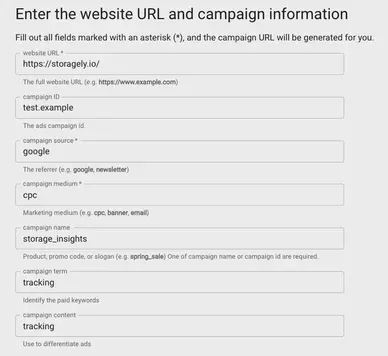
Step 2: Enter Your Website URL
In the "Website URL" field, enter the URL of the page you want to track. This is the landing page where you want your visitors to go. Example: https://storagely.io/
Step 3: Fill in the Campaign Parameters
You need to fill in the following fields to create a custom URL:
- Campaign Source: This identifies the source of your traffic, such as a search engine, newsletter, or another referral. Example: google, newsletter, facebook
- Campaign Medium: This identifies the medium of your campaign, such as email, cost-per-click (cpc), or social media. Example: email, cpc, social
- Campaign Name: This identifies the specific campaign you're running. Use a name that makes sense to you and your team. Example: summer_sale, product_launch, newsletter_july
- Campaign Term (optional): This is used for paid search to identify the keywords for your ad. Example: self+storage, discounts+promotions
- Campaign Content (optional): This is used to differentiate similar content or links within the same ad or campaign. Example: logolink, textlink, banner
Step 4: Generate the URL
Once you have filled in all the required fields, the tool will automatically generate a custom URL in the "Generated campaign URL" box at the bottom.
Example: https://storagely.io/?utm_source=google&utm_medium=cpc&utm_campaign=discounts+promotions
Step 5: Use the Custom URL (optional)
- Copy the generated URL.
- Use this URL in your marketing campaigns. You can include it in emails, social media posts, ads, or any other medium you're using for your campaign.
Step 6: Track the Campaign in Google Analytics
- Once your campaign is live and people start clicking on your custom URL, you can track the performance of your campaign in Google Analytics.
- Log in to your Google Analytics account.
- Go to Acquisition > Campaigns > All Campaigns.
- Here, you'll see the data for your custom campaign, including the number of sessions, bounce rate, and conversions.
Tips for Using Google Campaign URL Builder
- Be consistent with your naming conventions for sources, mediums, and campaign names to maintain clean and organized data.
- Use short and descriptive names for parameters to make it easy to understand your reports.
- Avoid using spaces in your parameters; use underscores or hyphens instead.
Conclusion
Using the Google Campaign URL Builder can greatly enhance your ability to track and analyze the effectiveness of your marketing efforts. By creating custom URLs, you can gain insights into which sources and mediums are driving the most traffic and conversions, allowing you to optimize your campaigns for better performance.
As always, if you have any questions during this process, our Customer Success Team is here to help. The best way to reach us is by submitting a support ticket.