How to Enable Future Date Rentals
Future Rentals in Storagely: Benefits, Considerations & How to Enable
Storagely allows storage operators to offer future rentals when customers rent online. This feature provides convenience and flexibility, enabling tenants to secure a unit in advance. However, there are also some important considerations to keep in mind, such as locking up limited inventory for extended periods.
Benefits of Allowing Future Rentals
✅ Improves Customer Experience – Future rentals allow tenants to plan ahead and ensure they have a storage unit ready when they need it. This is especially helpful for moving, business storage, or seasonal storage needs.
✅ Reduces Last-Minute Stress – Customers don’t have to rush to find a unit at the last minute. Instead, they can complete the rental weeks in advance and move in when ready.
✅ Increases Conversion Rates – Without a future rental option, potential tenants might leave your website if they can’t rent for their desired move-in date. Offering future rentals keeps them engaged instead of looking elsewhere.
✅ Allows for Better Staff Planning – Knowing future move-ins ahead of time helps managers schedule staff and maintenance efficiently.
✅ Drives Higher Occupancy Rates – A unit that’s rented for a future date is already off the market, ensuring steady occupancy rates and revenue flow.
Considerations & Potential Downsides
⚠️ Locks Up Limited Inventory – If too many units are reserved for future dates, current customers looking for immediate move-ins may have fewer options.
⚠️ Increased No-Show Risk – Renters who book far in advance might change their plans and never show up. Implementing cancellation policies can help mitigate this.
⚠️ Pricing Conflicts – If rental rates increase between the time of booking and the move-in date, customers may be locked into lower pricing, potentially affecting revenue.
⚠️ Misalignment with Business Hours – If a facility is closed on specific days, future rentals could be scheduled for unavailable dates. Storagely solves this by allowing you to disable specific days from rental availability.
How to Enable Future Rentals in Storagely
For SiteLink Users
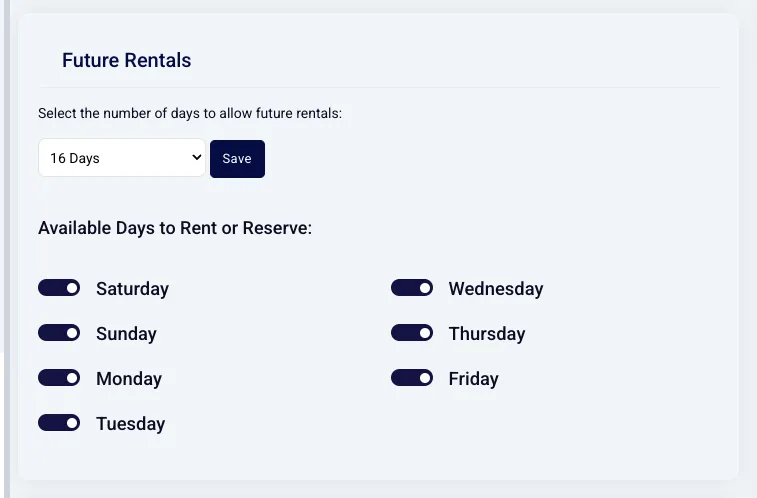
By default, SiteLink allows future rentals, so all you need to do is configure the number of days in advance renters can select.
Steps to Enable Future Rentals in SiteLink:
1️⃣ Log into the Storagely Portal 2️⃣ Navigate to Rental System 3️⃣ Go to Rental System Settings 4️⃣ Configure the number of days you want to allow future rentals 5️⃣ Unselect any days your facility is closed (e.g., weekends or holidays)
For storEDGE Users
Unlike SiteLink, storEDGE does not enable future rentals by default. To allow future rentals on Storagely, you must first enable this feature in storEDGE and ensure the settings match.
Steps to Enable Future Rentals in storEDGE:
1️⃣ Log into storEDGE 2️⃣ Navigate to Settings > Move-In Settings 3️⃣ Enable the Future Move-In option 4️⃣ Set the maximum number of days allowed for future rentals 5️⃣ Ensure that the same dates are configured in Storagely
⚠️ Important Note: If you change future rental settings in storEDGE, you must also update them in Storagely. If the dates do not match, it can cause errors during checkout.
📌 For a full walkthrough, visit: storEDGE Future Move-Ins Guide
For Self Storage Manager (SSM) Users
At this time, Self Storage Manager (SSM) does not support future rentals in Storagely. This may change in future updates.
FAQ: Can We Offer Future Reservations Too?
Yes! Future reservations work the same way as future rentals but must be configured separately in the Rental Settings Page inside the Storagely portal.
Final Thoughts: Should You Enable Future Rentals?
Future rentals increase conversions, improve customer satisfaction, and streamline operations. However, storage operators should carefully manage their inventory to avoid overcommitting units and creating availability issues.
With Storagely’s flexible settings, you can: ✔ Choose how many days in advance customers can rent ✔ Restrict specific days for rentals or reservations ✔ Sync future rental settings with your FMS (SiteLink or storEDGE)
📢 Want to start offering future rentals? Configure your settings today in Storagely, or reach out for assistance! 🚀