🔧 Fixing Incorrect Unit Details, Prices, or Promotions
If your website shows outdated unit details, pricing, or promotions, you can use Storagely's Data Sync feature for faster updates from your Facility Management Software (FMS).
Storagely seamlessly integrates with Sitelink, StorEDGE, and SSM, syncing updates automatically every hour. This ensures your website reflects real-time changes in unit availability, pricing, and promotions.
If you notice discrepancies, start by confirming the data in your FMS Admin portal. If the FMS is correct but your website is not, follow these steps for a manual sync:
How to Manually Sync Your Data
- (1) Log In: Access your Storagely Dashboard.
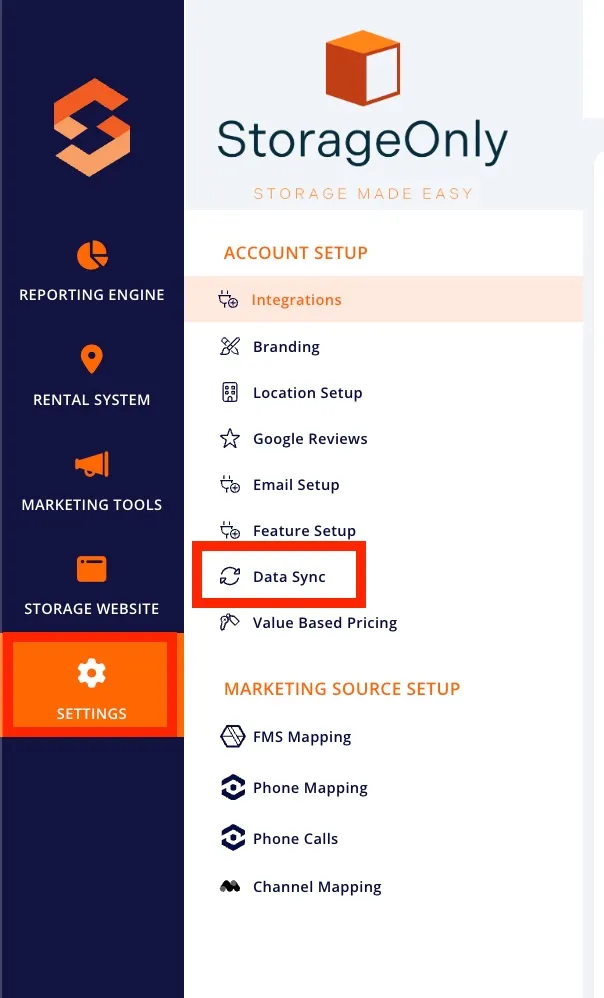
- (2) Run the Sync:
- Click the Synchronization button for each data type in order.
- Wait a few seconds for each sync to process.
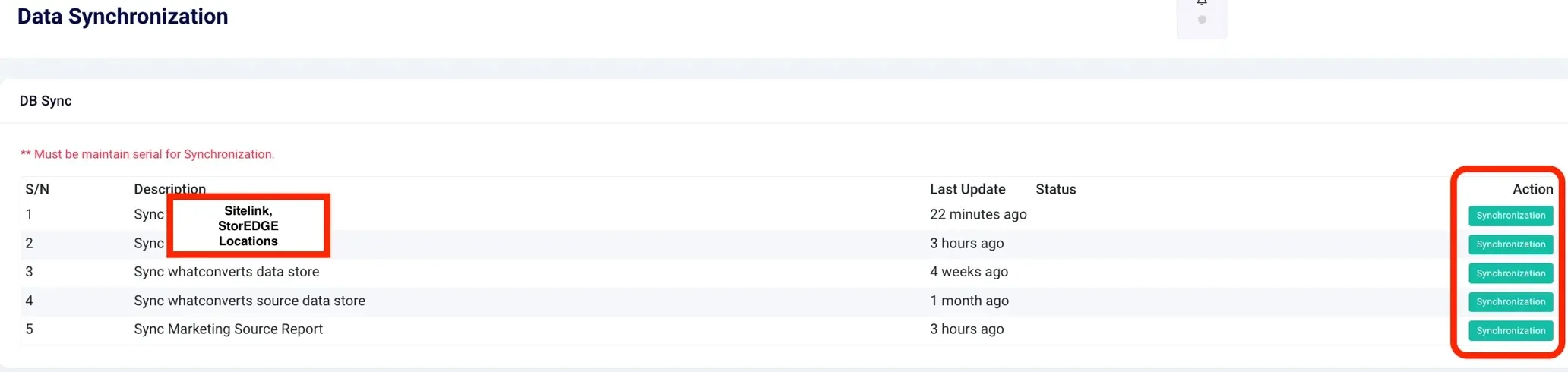
- (3) Verify: Once syncing is complete (up to 10 minutes), check your website to confirm updates are reflected.
By manually syncing, you can immediately reduce delays in updating your site, ensuring your customers see the most accurate pricing, promotions, and availability. This simple process helps you stay ahead and keep your website current.
As always, if you have any questions during this process, our Customer Success Team is here to help. The best way to reach us is by submitting a support ticket.