Customizing the Rental Checkout Fields
Optimizing the Rental Checkout Process: Balancing Required Fields & Conversion Rates
When a customer is ready to rent a storage unit online, the checkout process plays a crucial role in conversion rates (CRO). Asking for too much information can overwhelm users and cause them to abandon the rental, while not collecting enough details can lead to operational challenges for self-storage operators.
At Storagely, we provide a streamlined three-tiered approach to rental checkout fields:
- Standard Options – The essential fields required to complete a rental.
- Helpful Questions – Extra fields that can enhance operations without drastically reducing conversions.
- Other Questions – Additional data that might be useful but should be used sparingly to avoid drop-offs.
The key to maximizing rentals is finding the right balance between necessary information and a frictionless checkout experience.
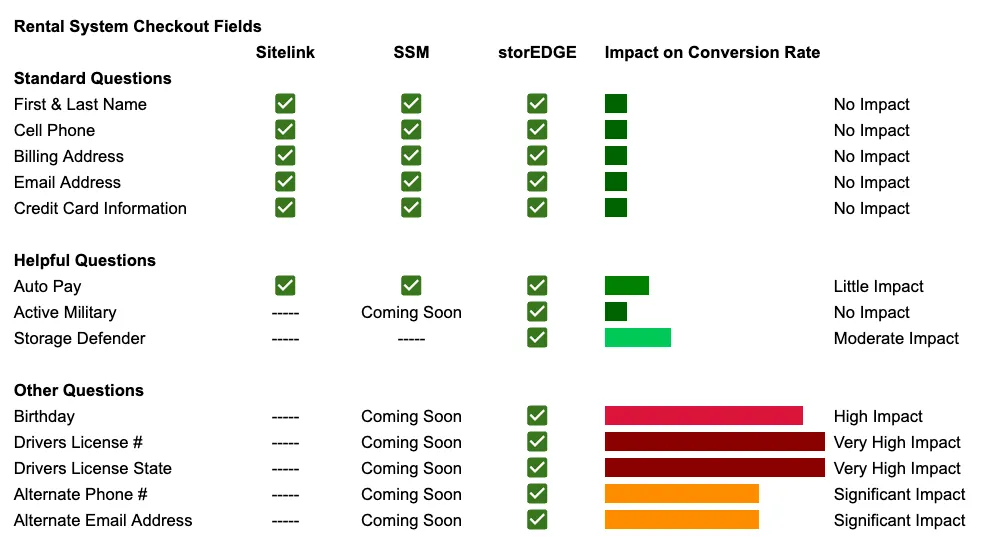
Understanding Checkout Fields & Their Impact on Conversion Rates
Not all fields have the same impact on conversion rates (CRO). Some are essential, while others create friction that may lead to renters abandoning the process.
For example, fields like Name, Phone, and Email are low friction—customers expect them. However, requesting details such as Date of Birth, Driver’s License, or Emergency Contacts can introduce hesitation and increase drop-offs.
How Too Many Fields Hurt Conversion Rates:
📉 Longer checkout times = More drop-offs – The more steps and questions, the higher the chance a renter quits halfway through. 📉 Privacy concerns – Some renters may hesitate to enter sensitive data, like a driver’s license number. 📉 Decision fatigue – Too many choices or questions can overwhelm potential renters, leading them to exit before completing the rental.
Storagely’s Three-Tiered Approach to Rental Fields
1. Standard Options (Essential Fields for a Rental)
These fields are non-negotiable and required to complete an online rental. They ensure you collect enough information without hurting conversion rates.
✅ First & Last Name – Basic identification to personalize the rental. ✅ Phone Number – Essential for confirmations and communication. ✅ Email Address – Required for lease agreements and digital receipts. ✅ Payment Information – To process the first month’s rent and fees. ✅ Unit Selection – Confirms the chosen unit and rental terms. ✅ Move-in Date – Defines when the rental begins.
💡 Why These Fields Work: These fields provide just enough information to secure a rental without overwhelming the user. They maintain a high conversion rate while ensuring smooth operations.
2. Helpful Questions (Recommended but Optional Fields)
These fields add value without significantly hurting conversions. They are helpful for operators but should only be used if necessary.
🔹 Billing Address – Useful for fraud prevention, but may cause drop-offs. 🔹 ID Verification (Driver’s License or Passport) – Some renters may hesitate, so consider making it optional. 🔹 Alternate Contact / Emergency Contact – Helps with abandoned units but can feel excessive during checkout. 🔹 Vehicle Information (If storing a vehicle) – Only relevant if the renter is storing a car, RV, or boat.
💡 How to Use These Fields Effectively:
- Minimize friction by making them optional or asking them after the rental is confirmed.
- Use conditional logic—only ask for vehicle details if the renter is storing a vehicle.
3. Other Questions (Low-Impact, High-Friction Fields)
These fields can hurt conversions because they add friction without providing immediate benefits. Use them only when absolutely necessary.
🚫 Date of Birth – Can feel unnecessary unless required for legal reasons. 🚫 Employer Information – Rarely relevant for self-storage rentals. 🚫 Social Security Number – Avoid at all costs! Asking for SSNs creates a major barrier to conversions.
💡 Best Practice:
- Only ask these questions after the rental is completed, or as part of an optional follow-up.
- Use post-rental onboarding (email or portal) to collect any additional information without hurting the conversion rate.
How to Maximize Rentals While Minimizing Fields
1. Reduce Required Fields to the Essentials
The fewer fields you require, the more likely renters are to complete the process.
🚀 Storagely’s streamlined rental process ensures renters can secure a unit in under a minute by limiting the number of required fields.
2. Use Smart Field Placement
- Ask for payment first – Once the renter enters their payment info, they are more likely to finish the process.
- Show important details upfront – Avoid surprising renters with unexpected fees or rules at the end.
3. Use Conditional Fields to Keep the Experience Simple
- Only show extra fields when relevant (e.g., vehicle storage questions only if the renter selects a vehicle unit).
- Offer tooltips instead of extra questions—this keeps the form short while still providing clarity.
4. Follow Up for Additional Details
Instead of asking everything during checkout, request extra information later via email or an account dashboard.
📧 Example: “Thank you for renting! To complete your profile, please confirm your emergency contact.”
Conclusion: The Right Fields Drive More Rentals
The more questions you ask upfront, the more likely renters will abandon the process. By minimizing required fields, using smart placement, and collecting extra details post-rental, Storagely ensures higher conversions and a seamless rental experience.
🚀 Storagely helps you:
✔ Increase online rental conversions ✔ Reduce friction for potential renters ✔ Capture leads while still collecting necessary details
Want to boost your self-storage rentals while keeping the process fast and user-friendly? Storagely’s optimized rental flow makes it happen.
📢 Ready to convert more website visitors into paying tenants? Let’s Storagely! 🚀