Channel Mapping Settings
1. Overview
The Channel Mapping feature in the Storagely Dashboard allows operators to assign, modify, and manage marketing and lead source channels. This ensures that data is correctly categorized and attributed to the appropriate source, helping businesses track customer interactions effectively.
Important Notice:
- By default, Channel Mapping is disabled for operators.
- To gain access, operators must request permission from an Administrator or Account Manager.
2. Requesting Access to Channel Mapping
To enable Channel Mapping for operators, follow these steps:
- Contact your Storagely Account Manager or Administrator.
- Request access to Channel Mapping settings in your user permissions.
- If approved, log in again and navigate to Settings > Channel Mapping.
3. Accessing Channel Mapping (Once Enabled)
Once access is granted, follow these steps:
- Login to the Storagely Dashboard.
- Click on Settings in the left sidebar.
- Select Channel Mapping.
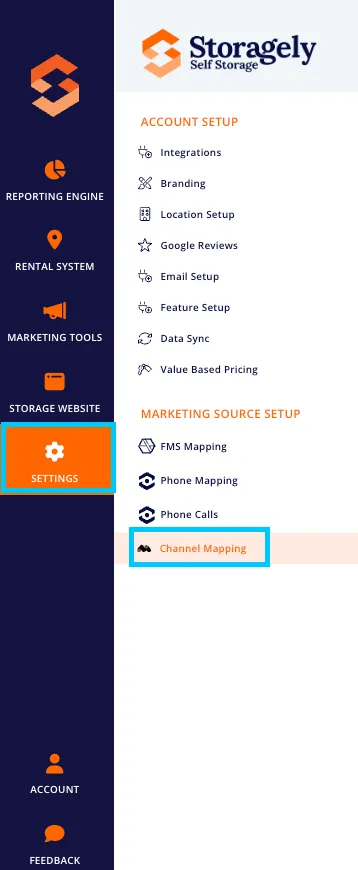
- The system will display all available channels and their mappings.
4. Configuring Channel Mapping
A. Adding a New Channel Mapping
- Click “Add New Mapping”.
- Select the Source Channel from the dropdown list.
- Assign the Destination Channel (the correct Storagely source).
- Click “Save” to apply the mapping.
B. Modifying an Existing Mapping
- Locate the mapping in the list.
- Click Edit to modify the Source or Destination Channel.
- Click “Update” to save changes.
C. Deleting a Channel Mapping
- Select the mapping to remove.
- Click “Delete” and confirm the action.
5. Troubleshooting & FAQs
Issue | Cause | Solution |
|---|---|---|
Channel Mapping not visible | Disabled for operators | Request access from an admin |
Changes not saving | Insufficient permissions | Verify user role settings |
Incorrect mappings | Misconfigured source/destination | Double-check mappings before saving |
As always, if you have any questions during this process, our Customer Success Team is here to help. The best way to reach us is by submitting a support ticket.