Abandoned Rentals Report
1. Introduction
The Abandoned Rentals Report in the Marketing Section of the Storagely Reporting Engine helps facility operators track customers who abandoned their rental process before completing payment. The system also identifies customers who later returned and finalized their rental, providing valuable insights into abandoned rental recovery.
Users can access this report for a single facility or across an entire portfolio, allowing for both localized and high-level analysis.
2. Navigating to the Abandoned Rentals Report
To access the Abandoned Rentals Report:
- Log in to your Storagely Dashboard.
- In the left sidebar menu, click on Reporting Engine.
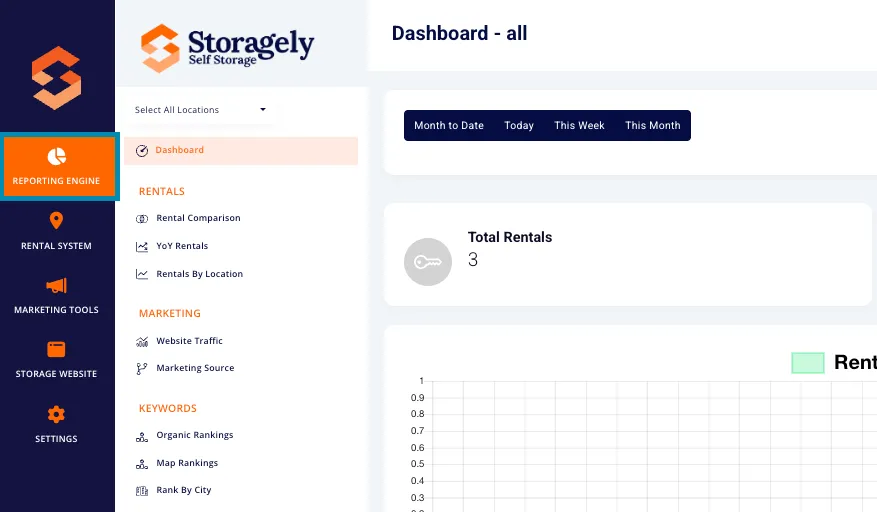
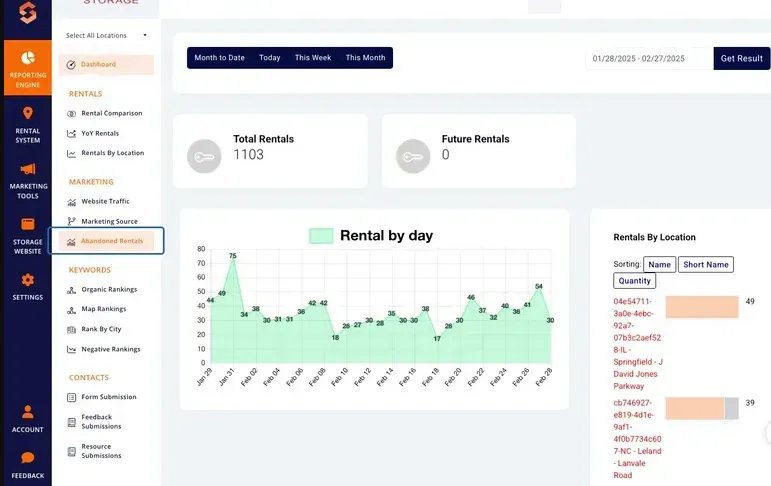
- Navigate to the Marketing Section and select Abandoned Rentals.
3. Understanding the Interface
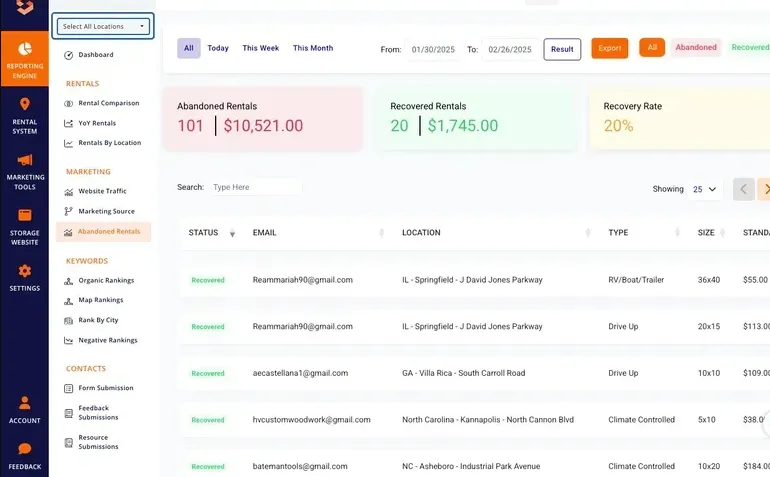
A. Selecting Locations
Users can obtain data for a single facility or all locations using the dropdown menu in the top left corner. This allows facility managers to analyze abandonment and recovery trends at a specific site or across an entire portfolio.
B. Date Range Selection
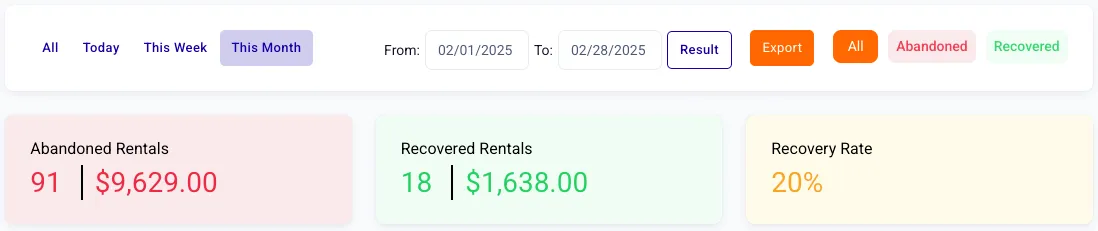
Users can choose from predefined or custom date ranges to analyze abandonment trends over time:
- Month to Date (default)
- Today
- This Week
- This Month
- Custom Date Range (Manually select start and end dates and then select the Result button)

C. Key Metrics Displayed
The report provides three primary data points:
- Abandoned Rentals
- The number of rental transactions abandoned before payment.
- Total revenue lost from abandoned rentals.
- Recovered Rentals
- The number of previously abandoned rentals that were later completed.
- Total first-month revenue recovered from these rentals.
- Recovery Rate (%)
- The percentage of abandoned rentals that were later recovered, calculated as: (Recovered Rentals ÷ Abandoned Rentals) × 100
- A higher recovery rate indicates an effective abandoned rental recovery strategy.
D. Exporting Data
Users can export abandoned and recovered rental data at the site or portfolio level. The exported report includes:
- Status (Abandoned or Recovered)
- Customer Email
- Location (Facility name)
- Type (Unit Type)
- Size (Unit Size)
- Standard (Rate)
- Discount (from Standard Rate)
- Abandoned Time
- Rental Time (if recovered)
- Phone (Customer Phone Number)
- Name (Customer Name)
To export:
- Click the orange Export button in the top-right corner.
- Download the data as a CSV file for further analysis.

4. How the Abandoned Rental System Works
- Tracking Abandoned Rentals
- When a customer starts the rental process by entering their first name, last name, email, and phone number, but leaves before making payment, the system logs the abandoned rental.
- The system will check if a successful rental has been submitted in the FMS, and if a rental is not found, then within approximately 15 minutes, the system sends an automated email to both the customer and the facility email address, encouraging the customer to complete their rental.
- This also provides an opportunity for the Facility Manager to follow up, offer assistance, and answer any questions needed to help complete the rental.
- Monitoring Recovered Rentals
- The system tracks abandoned rental customers who later return and complete the transaction.
- If a customer finalizes their rental after initially abandoning, they are recorded as a Recovered Rental in the report.
- Recovery Rate Calculation
- The Recovery Rate reflects the percentage of abandoned rentals successfully recovered.
- A high recovery rate means your follow-up efforts are effective.
- Revenue Metrics
- The Abandoned Rentals Revenue shows the total first-month revenue lost from abandoned rentals.
- The Recovered Rentals Revenue displays the first-month revenue recovered from customers who completed their rental after abandonment.
5. Best Practices to Improve Abandoned Rental Recovery Rate
To increase the Recovery Rate and convert abandoned rentals into completed transactions, facility operators can follow these best practices:
A. Implement a Strong Follow-Up Process
- Establish a structured process for your call center or facility teams to follow up with customers via phone or SMS.
- Contact the customer shortly after abandonment, reinforcing the benefits of completing their rental.
- Keep the conversation helpful and non-pushy, addressing any concerns that may have led to abandonment.
B. Personalize Customer Outreach
- When reaching out, use the customer’s name and details about their abandoned rental (e.g., unit size, location).
- Ask if they have any questions or concerns and provide assistance in completing the rental.
C. Use SMS as a Quick Follow-Up Tool
- Some customers may not answer phone calls, but they are more likely to engage with a text message.
- Send a friendly reminder via SMS with a link to complete their rental.
D. Monitor & Analyze Trends
- Regularly review the Abandoned Rentals Report to identify patterns.
- If a specific facility has a high abandonment rate, investigate potential causes.
- Track the effectiveness of follow-up efforts and refine your approach as needed.
6. FAQs & Troubleshooting
Q1: Why don’t I see data for certain locations? A: Ensure the correct location is selected in the dropdown.
Q2: How can I reset my filters? A: Refresh the page or manually adjust the date range and filters.
Q3: How can I improve my recovery rate? A: Optimize follow-up emails, personalize communication, and use customer support.
Q4: Can I export abandoned rental data? A: Yes! Click Export to download site- or portfolio-level rental data in CSV format.
As always, if you have any questions during this process, our Customer Success Team is here to help. The best way to reach us is by submitting a support ticket.