All Reviews
1. Introduction
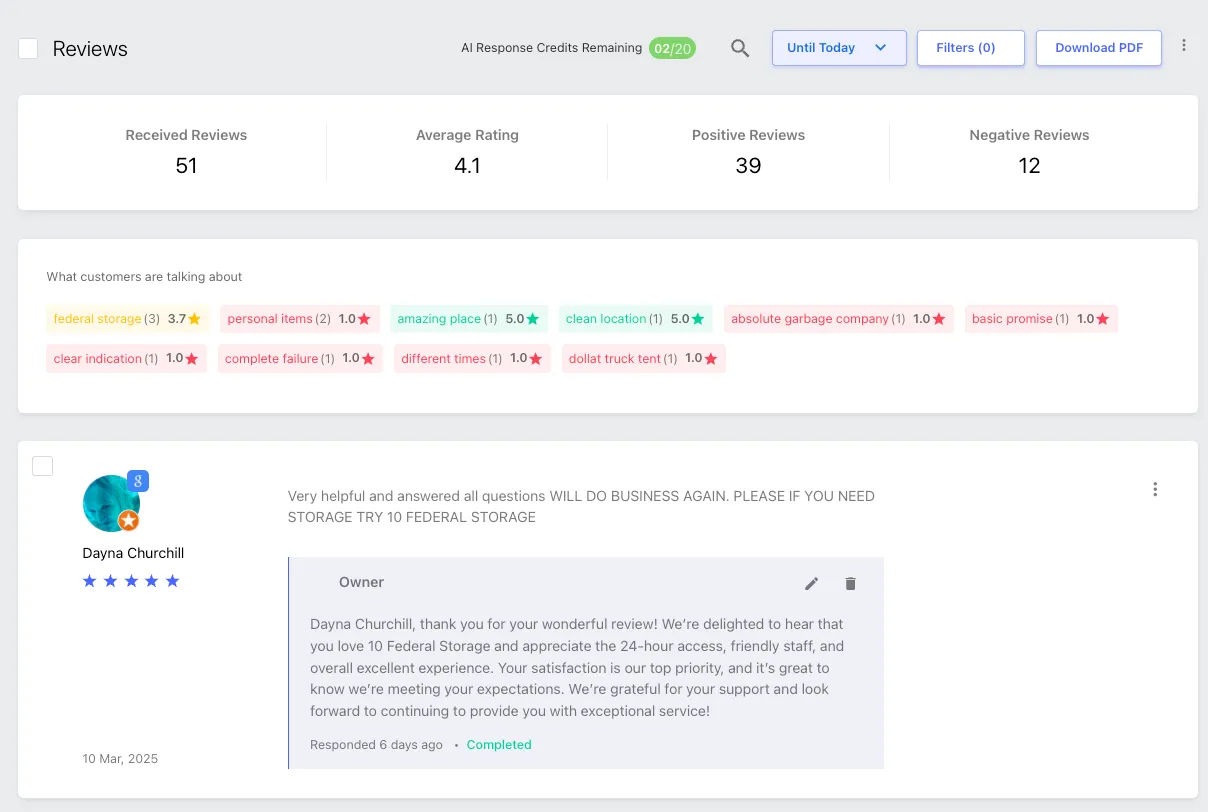
The All Reviews section under Engage > All Reviews in the Storagely Listings Tool allows operators to view, manage, and respond to customer reviews from multiple online directories in one place. This section helps operators track customer feedback, engage with reviewers, and improve their business reputation by ensuring timely responses.
2. Accessing All Reviews
- Log in to the Storagely Listings Tool.
- Navigate to Marketing Tools > Listings.
- Click on Engage > All Reviews to access the review management dashboard.
3. Features of the All Reviews Section
A. Reviews Dashboard
The All Reviews dashboard provides a centralized view of customer feedback across multiple review platforms such as:
- Google Business Profile
- Yelp
- Other directory listings
B. Review Filters & Sorting Options
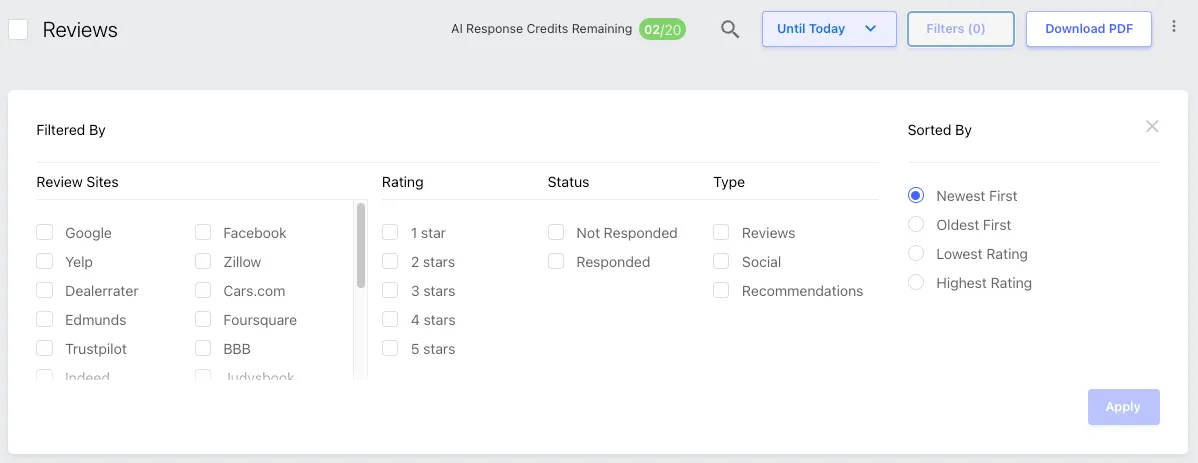
Operators can filter and sort reviews based on:
- Timeframe – View reviews from the last 7 days, 30 days, 60 days, or a custom date range.
- Ratings – Filter reviews by star ratings (1-star to 5-star reviews).
- Response Status – Identify responded vs. unresponded reviews.
- Platform – View reviews from specific directories (e.g., Google only).
Tip: Use filters to prioritize negative reviews that need urgent responses.
C. Responding to Reviews
Operators can reply directly to customer reviews from within the Listings Tool.
- Click "Reply" under a review.
- Type the response and submit it directly to the platform (if supported).
- Responses will sync with the original review platform.
Best Practice: Always respond professionally and thank customers for positive feedback.
D. Flagging Reviews for Removal
Operators can flag inappropriate or fake reviews for removal consideration by the review platform (e.g., Google, Yelp).
Important: Operators should NOT respond to reviews that they plan to flag.
- Responding to a flagged review acknowledges the review, reducing the likelihood that it will be removed, even if it violates platform policies.
- Instead, flag the review first and allow time for the review platform to assess it.
E. Additional Review Actions
Operators can also:
- Add internal notes to reviews for team tracking.
- Automate review responses (Requires Storagely Support) to save time on high-volume responses.
4. What Operators Can & Cannot Do in the All Reviews Section
✅ Operators CAN: ✔ View and monitor all reviews from connected listings. ✔ Filter and sort reviews based on rating, platform, and timeframe. ✔ Respond to reviews directly within the dashboard. ✔ Flag inappropriate or fake reviews for platform assessment. ✔ Add internal notes for internal tracking and follow-ups.
❌ Operators CANNOT: ✘ Delete reviews (only review platforms can remove them). ✘ Edit customer reviews. ✘ Respond to reviews that have been flagged for removal (doing so may prevent deletion). ✘ Automate review responses without Storagely Support assistance.
5. Best Practices for Review Management
✅ Respond promptly to customer reviews to show engagement. ✅ Thank customers for positive reviews to encourage loyalty. ✅ Address negative reviews professionally unless the review is being flagged for removal. ✅ Do NOT respond to flagged reviews to avoid reducing the chance of removal. ✅ Monitor flagged reviews and follow up with the review platform if necessary. ✅ Use automation (if enabled) to save time on responding to frequent review types.
As always, if you have any questions during this process, our Customer Success Team is here to help. The best way to reach us is by submitting a support ticket.