Calcumate 3D Storage Calculator
1. Overview
The Storagely 3D Storage Calculator, powered by Calcumate, is an interactive tool designed to help customers determine the right storage unit size for their needs. By visually arranging their items in a virtual storage unit, tenants can ensure they select the most efficient unit size before making a reservation.
This feature is fully integrated into Storagely-powered self-storage websites, allowing users to access and utilize the tool without needing third-party accounts or additional software.
For a visual walkthrough, watch the explainer video below on how the 3D Storage Calculator works.
2. Benefits for Self-Storage Operators
Enhanced Customer Experience
- Accurate Unit Recommendations: By providing precise unit size suggestions, customers can confidently select storage spaces that fit their needs, reducing uncertainty and improving satisfaction.
Increased Conversion Rates
- Seamless Integration: Embedding the 3D Storage Calculator into your website streamlines the rental process, making it easier for potential customers to commit to a rental.
Operational Efficiency
- Optimized Space Utilization: Accurate estimations help in better space management, ensuring that units are appropriately allocated and reducing instances of over or underutilization.
Lead Generation and Data Capture
- Valuable Customer Insights: The calculator can capture lead information, such as contact details and specific storage needs, enabling targeted marketing efforts and personalized customer service.
3. Key Features of the 3D Storage Calculator
Accurate Space Estimation
- Allows customers to input their items and receive tailored unit size recommendations, minimizing the risk of selecting inappropriate storage spaces.
3D Interactive Visualization
- Provides a virtual environment where users can arrange their belongings, offering a realistic preview of the storage layout.
Mobile-Friendly and User-Friendly Interface
- Designed to function seamlessly across various devices, ensuring accessibility and ease of use for all customers.
Seamless Integration
- Easily embeds into existing websites, aligning with your brand's aesthetics and providing a cohesive user experience.
4. How to Use the 3D Storage Calculator
Step 1: Access the Calculator
- Visit the self-storage facility’s website.
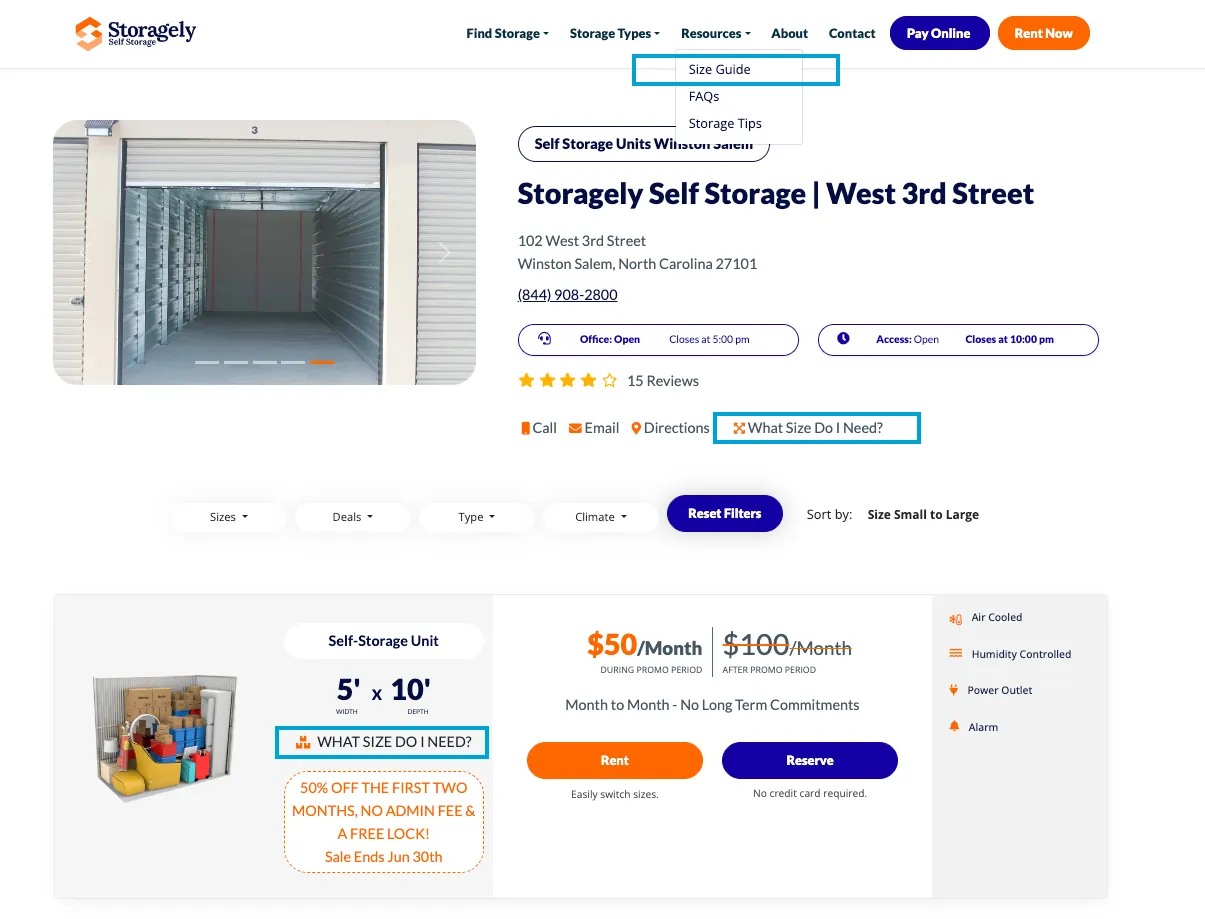
- Navigate to the Storage Unit "Size Guide" page or the “What Size Do I Need” section on the location page.
Step 2: Add Items to the Virtual Storage Unit
- Select items from a preloaded list (e.g., furniture, appliances, boxes).
- Choose from one of the presets at the top(e.g., 1 Bedroom, 2 Bedroom, etc.)
Step 3: Get a Recommended Unit Size
- The system analyzes the items and suggests the most suitable unit size.
- Users can adjust their selections to explore different size options.
- Once satisfied, customers will fill out the lead form and proceed to the checkout page to rent the recommended unit.
5. Introducing CalcumateGEO – Smarter Size Guides for Multi-Store Operators
CalcumateGEO is the first location-aware self-storage size guide designed for operators with multiple facilities. It transforms the traditional size calculator into a precise, localized tool that guides each user to their nearest store and the best-fitting unit size available.
Key Features:
- Automatically detects the customer’s location (or allows manual selection).
- Delivers store-specific sizing results.
- Sends the customer straight to the appropriate booking or rental page.
Why This Matters for Storagely Customers
As a native integration partner, Storagely supports CalcumateGEO across all supported websites. If you’re a multi-location operator, this means:
- You can enable a seamless, location-specific rental experience.
- Customers skip the confusion of general size guides.
- You get more rentals with fewer support questions.
How CalcumateGEO Works
Here’s what to expect from setup to deployment:
- Enablement (via Calcumate):
- Share your store geo-coordinates.
- Choose your location-detection method (IP, geolocation, or manual dropdown).
- Get a smart embed code from Calcumate.
- Smart User Routing:
- Customers land on your size guide and are auto-directed to the nearest store.
- The guide shows only relevant sizing options.
- A single click takes them to the correct booking/reservation page.
- Cross-Platform Flexibility:
- Works on any website.
- Fully compatible with platforms like Storagely, Storeganise, Stora, and 6Storage.
Getting Started
CalcumateGEO is free for all existing Storagely customers.
➡️ To activate:
- Connect with your Storagely Customer Success Manager to coordinate your rollout.
6. Frequently Asked Questions (FAQs)
Where can I access the 3D Storage Calculator?
The calculator is available on Storagely-powered self-storage websites under the Size Guide or What Size Do I Need? sections.
Do I need to create an account to use the calculator?
No, customers can use the tool without signing up.
Can I change my selected items after receiving a unit recommendation?
Yes, users can add or remove items at any time to adjust their storage unit recommendation.
Is the calculator optimized for mobile devices?
Yes, it works on desktops, tablets, and smartphones for on-the-go storage planning.
7. Best Practices for Using the 3D Storage Calculator
✅ Encourage customers to use the calculator before renting a unit to ensure proper sizing. ✅ Ensure the calculator is easily accessible on the website by placing it in prominent sections like What Size Do I Need? and Storage Unit Size Guide. ✅ Advise renters to leave some extra space if they plan to access their stored items frequently.
As always, if you have any questions during this process, our Customer Success Team is here to help. The best way to reach us is by submitting a support ticket.